Payment Capture Process
Modified on: Wed, 29 Jul, 2026 at 12:36 PM
How to complete payment to get your product setup
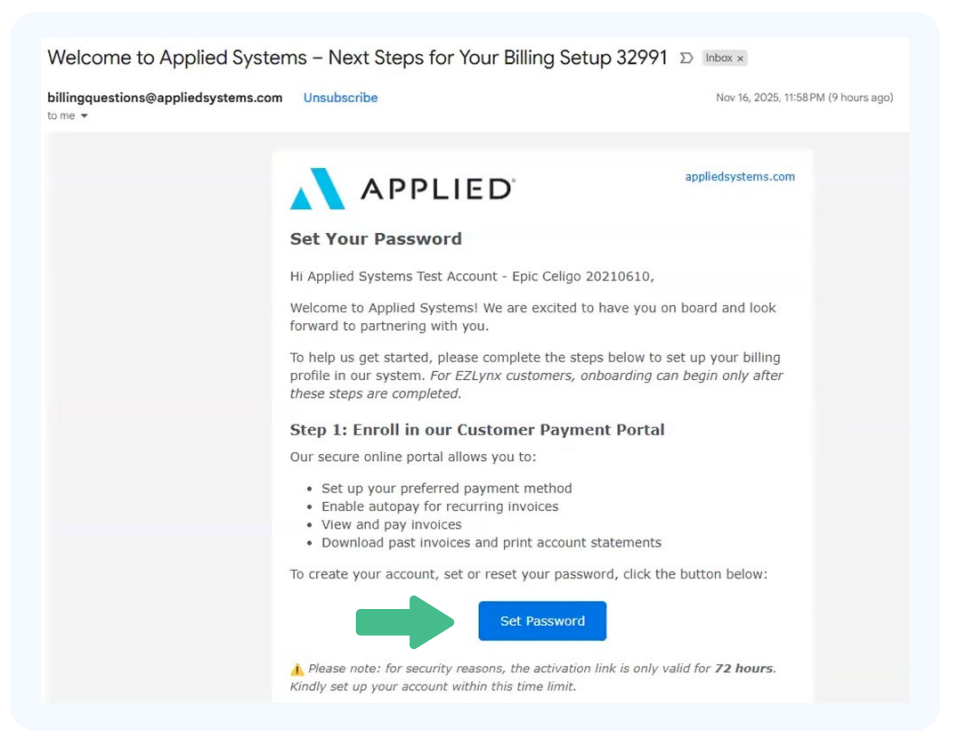
About an hour after signing your contract, you will receive an email from billingquestions@appliedsystems.com.
Reminder: We cannot setup your product until you have completed all of these steps including:
- Setting up and logging into the portal.
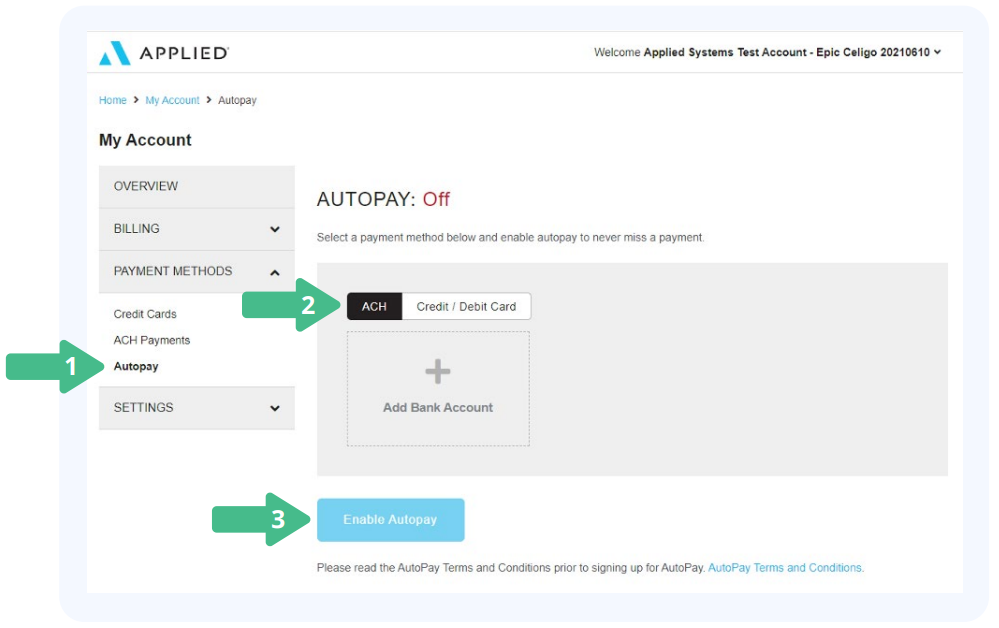
- Setting up a payment method and enabling auto pay.
In this article, we'll cover how to create your account and setup a payment method along with how to enable auto-pay. We also address some common billing and payment portal questions in our FAQ sections at the end. At the very bottom we've included a PDF attachment with these steps for you to save for later use.
TABLE OF CONTENTS
- How to complete payment to get your product setup
- Create Your Payment Portal Account
- Add Your Payment Method
- Enable Autopay
- Update Payment Method
- Pay my Bill
- FAQ
 | Create Your Payment Portal Account
 |
 | Add Your Payment Method
|
 | Enable Autopay
|
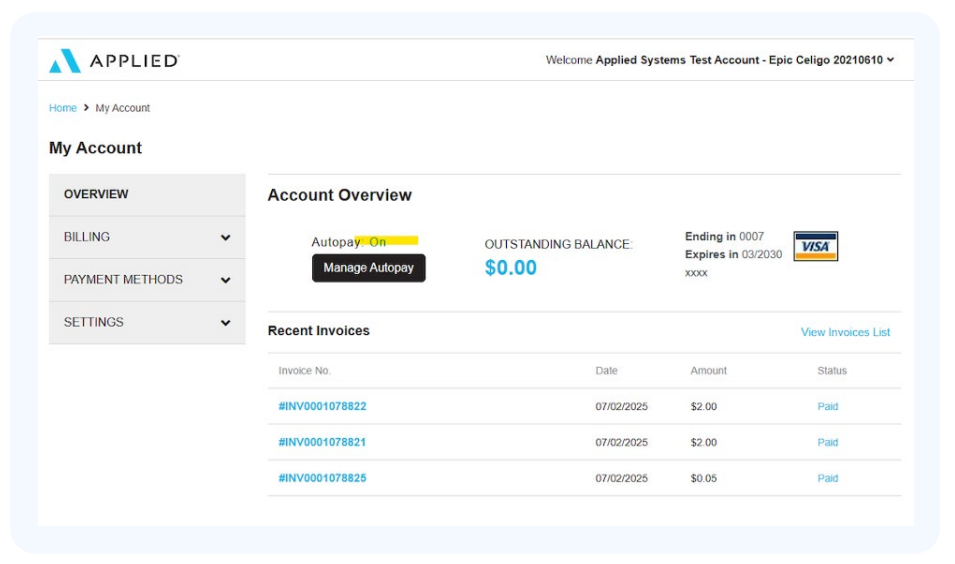
- Once your payment method is captured and auto pay is enabled, as seen below, the Onboarding Team will then reach out within 3 business days to begin your setup!
Update Payment Method
Once you've created your account, you might need to update your payment method at some point. Perhaps a credit card expired or you want to switch to ACH payments. Did you know you can access the payment portal from within EZLynx?
To access the portal after making your account:
1. Click on the Agency Admin (key) icon.
2. On the Manage Users tab, click on Manage Subscriptions. This will take you to the payment portal!

Now that you are back in the payment portal, you can update your payment method by:
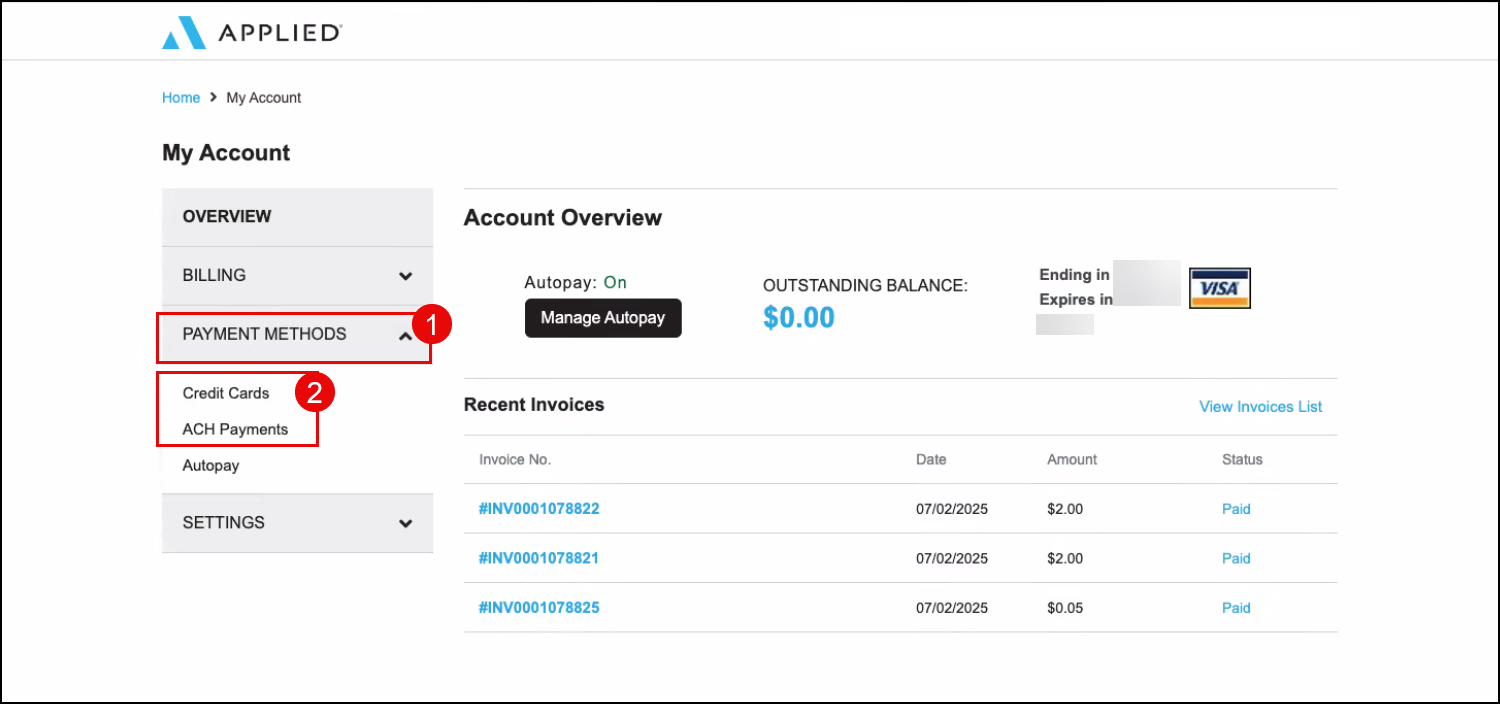
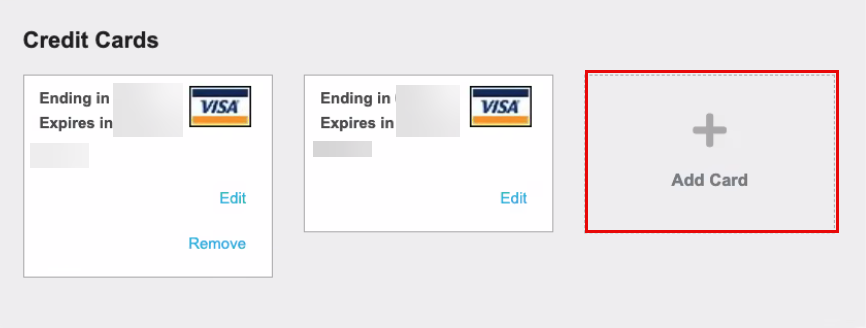
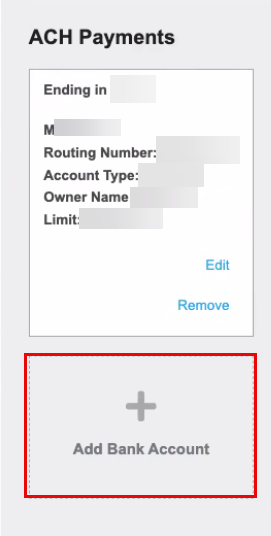
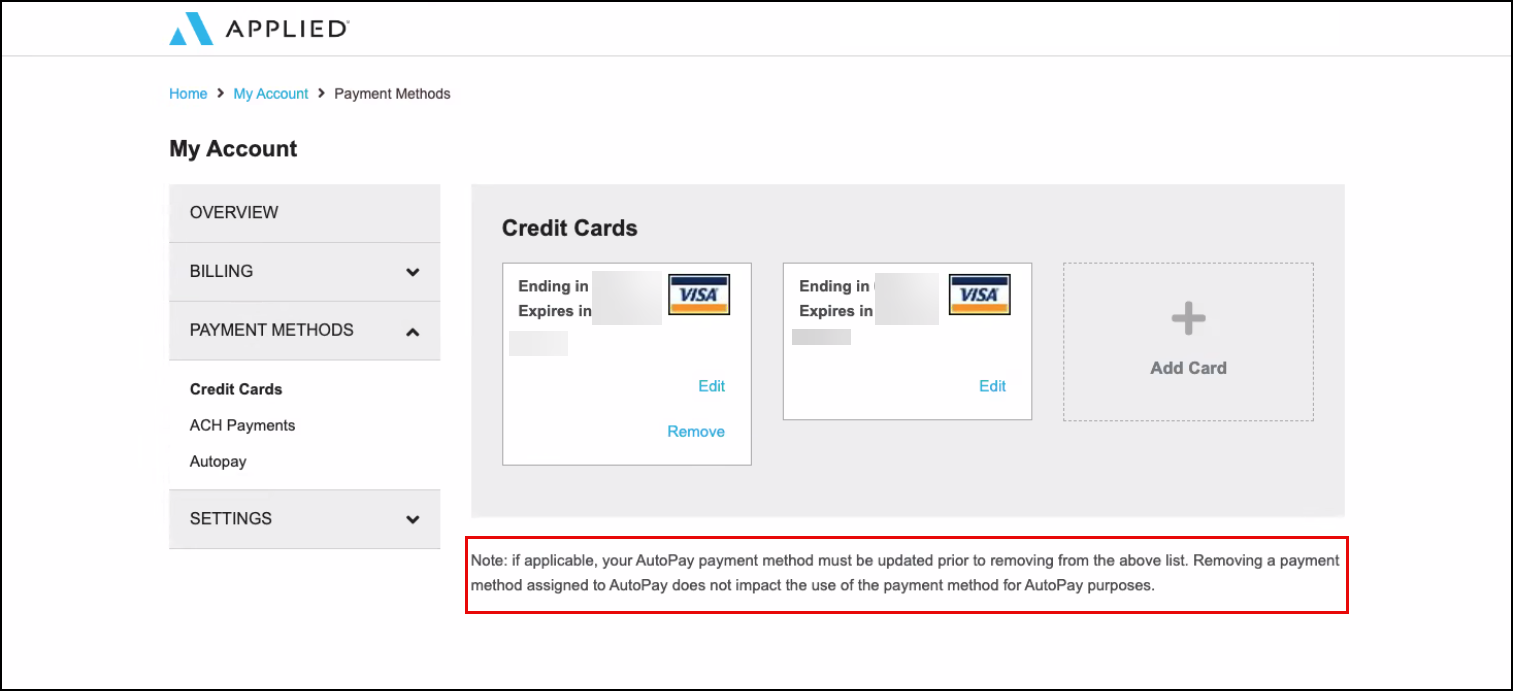
1. Expand Payment Methods on the left-side.
2. Then, choose either Credit Cards or ACH Payments. Here you'll find any existing payment methods you've entered.
To update a payment method, you will want to add the new payment option rather than edit an existing one because once added, the credit card number and account number fields are locked.
To update a payment method:
1. Click either the Add Card or Add Bank Account option.
 |  |
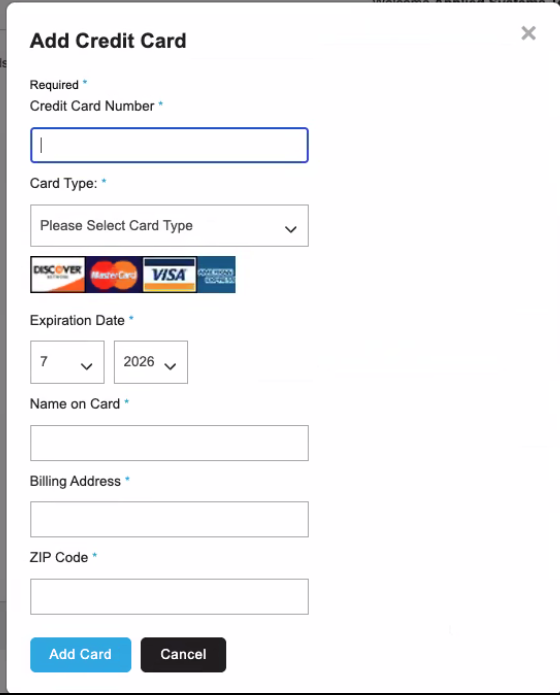
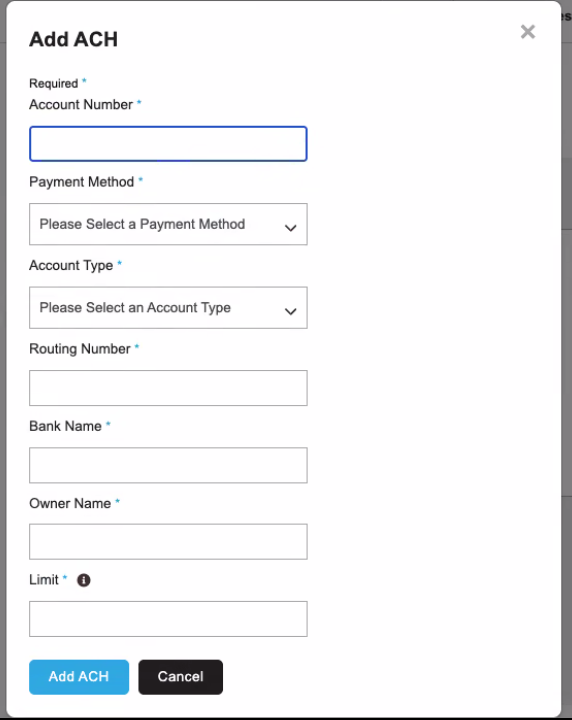
2. Input your new credit card or new bank account payment method info and click the Add Card or Add ACH button at the bottom.
 |  |
Once the new payment method is added, you can remove the old payment methods if they are not setup for AutoPay. If they are setup for AutoPay, you will not be able to remove that payment method until you update AutoPay to the new Payment Method. Check out the "Enable AutoPay" section of this article above to learn how to update AutoPay. Once you've updated AutoPay, you can then remove the old payment method if you need.
Pay my Bill
Need to pay your bill? Did you know you can access the Payment Portal from within EZLynx?
To access the portal after making your account:
1. Click on the Agency Admin (key) icon.
2. On the Manage Users tab, click on Manage Subscriptions. This will take you to the payment portal!
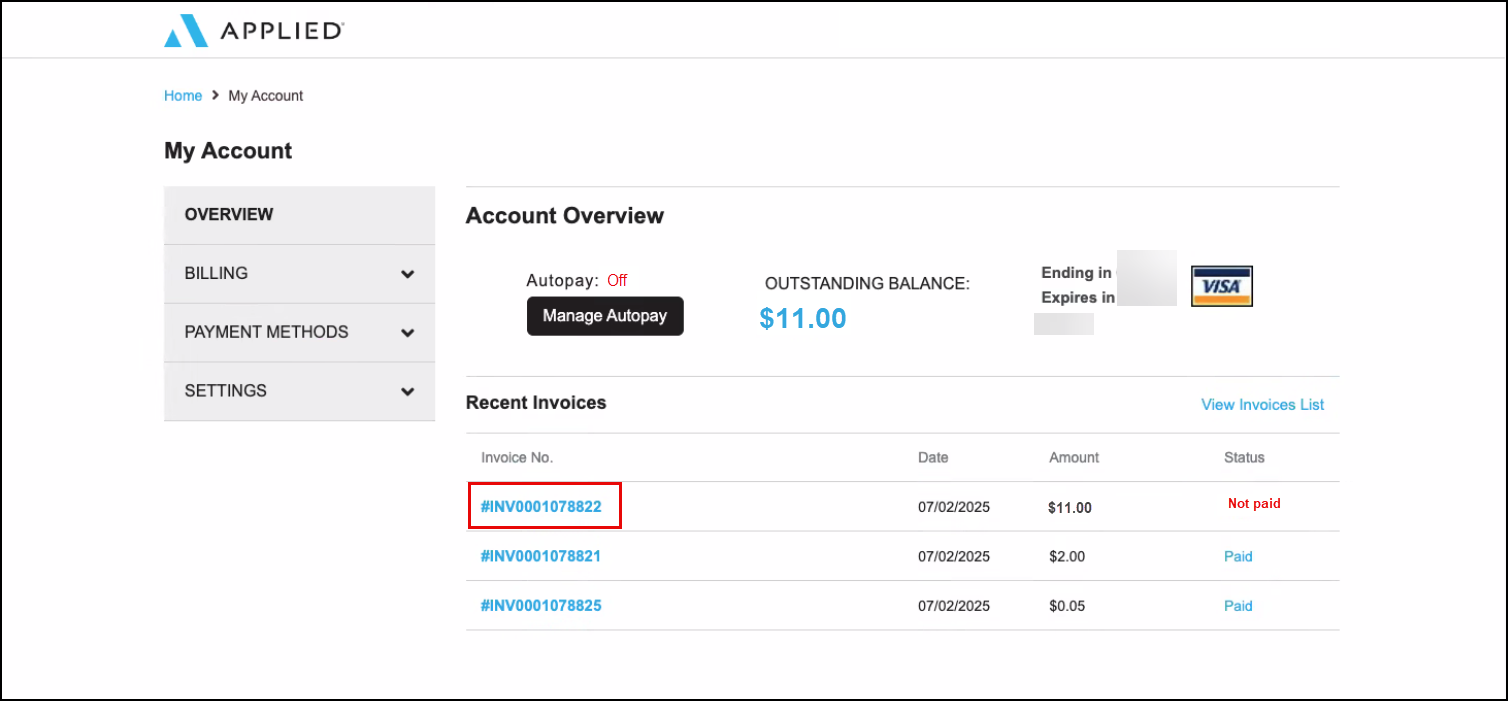
3. Select the Invoice to navigate to this specific invoice's page.
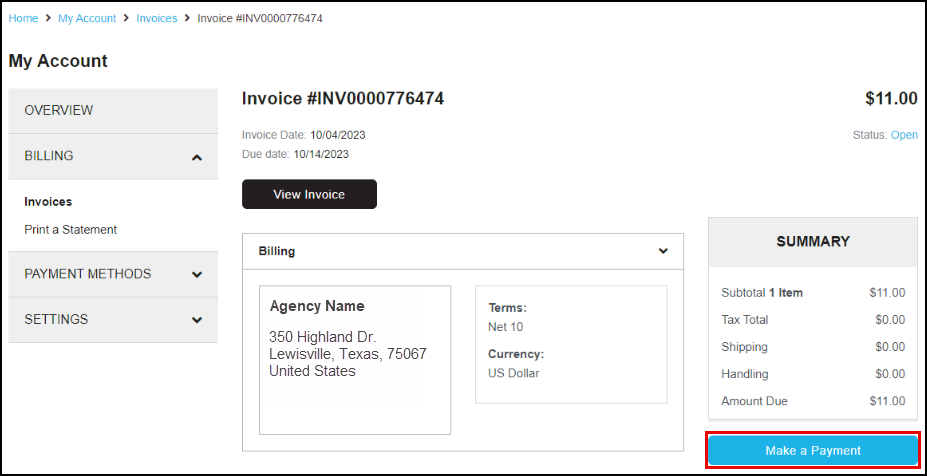
4. Select the Make a Payment button to pay your invoice.
We highly encourage setting up AutoPay to make sure you never miss a payment. To setup AutoPay, check out our "Enable Autopay" section of this article above.
FAQ
Use the Click Here button to quickly access the payment portal, or click on the questions below to see the answer.
Why did I receive a notification about an outstanding balance on my account?
- We reach out to customers if they have a partial or full balance due that is greater than 30 days due. Simply follow the steps in the notification to update your payment portal at https://billing.appliedsystems.com.
Has there been a change in the billing system?
- Yes, our billing recently switched systems to be unified under our parent brand, Applied Systems. All EZLynx billing notifications will come from an Applied Systems email alias.
How can I resolve outstanding billing issues?
- To resolve your billing issues:
- You can log into your payment portal https://billing.appliedsystems.com/
- If you haven't set up your payment portal yet, you can reach out to billingquestions@appliedsystems.com to get your login information.
Who can I contact for help with billing issues?
- For subscription-related inquiries (invoices, cancellations, product updates, user changes, amendments, portal access), please email billingquestions@appliedsystems.com or call (800) 999-5368 - Option 3 to speak with a Billing Specialist.
- For account statement and payment inquiries (outstanding balances, copy of statement, payment issues), please email accountsreceivable@appliedsystems.com.
- If you have questions about your bill, please contact our billing team at billingquestions@appliedsystems.com or call (800) 999-5368 - Option 3 for our billing department.
What should I do if I am not receiving emails/invoices from EZLynx billing?
- If you aren't getting emails from our Billing Team, please whitelist the following email addresses:
We hope this article was helpful in learning how to setup your Payment Portal account, setup a payment method, enable auto-pay, and resolve billing and payment portal issues. Please let us know if this article was helpful by answering the question below. Check out our related articles on the right-side of the page to learn more about EZLynx!
Did you find it helpful? Yes No
Send feedback