Reports 5.0 - Which Reports are available?
Modified on: Wed, 20 May, 2026 at 2:55 PM
Requirements:
|
All EZLynx users with Reporting permissions have access to the new Reports 5.0 system. Eventually, we will retire the old Reports 4.0 system. The best way to prepare for this is by taking proactive steps to get familiar with the new Reports 5.0 by recreating your reports in the new system.
To help with this, we've created this article so you can see that most of the reports from 4.0 have a direct translation into 5.0. However, there are two major changes when looking for the right report.
- Master Reports and Details: Master reports and Detail reports are now combined into just Details reports. This allows for less confusion around where to go when you need a report that has the most information available.
- Dashboards vs. Looks: There are two types of reports in the new system - Dashboards and Looks. Dashboards are a great way for getting a visual pulse as it uses graphs to showcase the data. Looks are a great way for detailed data analysis as the data is presented in the traditional data table style.
We hope this article helps you in getting familiar with the new Reports 5.0!
TABLE OF CONTENTS
 | Did you know? - You can click on the images in our articles to zoom in. |
Reports Menu
Just like in Reports 4.0, the Reports 5.0 menu is organized based on Categories. Each Category holds a list of reports that fit best into that category. For example, if you needed to run reports on your Direct Bill Commissions, you would check out the Commission category.
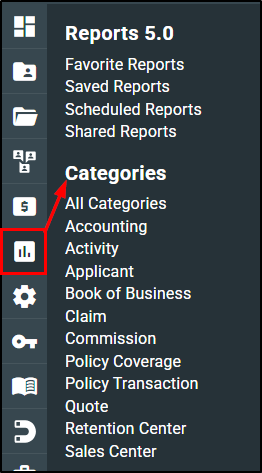
Reports 4.0 translations to Reports 5.0
Down below is a list of each of the Reports from 4.0 that have been converted to Reports 5.0 organized by Category.
Accounting |

- Accounting Reports have always been in available but only accessible under the Accounting Menu. Now with Reports 5.0, we've also added them to the Reports Menu so all your available reports are in one menu.
- Description: Streamline financial management with comprehensive reports covering General Ledger, Payables, and Receivables.
- Keywords: GL, Payables, Receivables
| Reports 4.0 Name | Reports 5.0 Name | Accounting Category | Report Type |
|---|---|---|---|
| Aged Receivables This report shows aged receivables balance by applicant. | Aged Receivables The Aged Receivable report reflects the invoices at EZLynx that have not been paid and the Agency Commission that you used to find in the old "Invoice Summary" report that has been retired. | Receivables | Dashboard |
| Aged Receivables by Branch This report shows aged receivables balance by branch. | Combined with Aged Receivables | Receivables | Dashboard |
| Cash Receipts This report shows cash receipts for a data range. | Cash Receipts This report shows cash receipts for a data range. | Cash | Dashboard |
| Check Register This report shows information for checks created in the system. | Check Register This report shows information for checks created in the system. | Cash | Dashboard |
| Deposit Summary This report shows deposit information for a selected bank deposit or deposits. | Deposit Summary View the summary of deposits made at your agency. If a subtotal appears to be in error, you can click to view the details. | Cash | Dashboard |
| Direct Bill Cash This report shows direct bill payments made to the agency. | Direct Bill Cash Review the details for the direct-bill payments within EZLynx that have been paid/unpaid (e.g., swept) to the carrier. | Cash | Dashboard |
| GL Export Audit This report shows the GL export file posting details grouped by invoice, receipt, or check to assist in identifying out-of-balance discrepancies. This is for QuickBooks Desktop users. | GL Export Audit The GL export file shows the posting details grouped by invoice, receipt, or check. This will assist you in identifying out-of-balance discrepancies within QuickBooks. | General Ledger | Dashboard |
| GL Posting Detail This report shows details for GL postings. | General Ledger Posting Use this report to ensure that the management system balances to QuickBooks. This can also be used to get the general ledger line item details. | General Ledger | Dashboard |
| Invoice Line Item Detail This report shows billing by line item type with a date range at a detailed or summary level. | Invoice Line Item Detail Allows to review the billing by line-item type for a date range at a summary or detailed level. Agencies often use this report to track specific line items. | Production | Dashboard |
| Invoice Summary This report shows posting for invoices within a date range. | Invoice Summary Review postings for invoices within a date range. | Receivables | Dashboard |
| Payable Work List This report shows payables due within a date range. It can be run for all payee types or a single type. | Payable Worklist Review the open or closed payables due to all payee types within EZLynx, including (Billing Companies, Producers, and 3rd Parties). | Payables | Dashboard |
| Payee List This report shows a list of all payees by payee type. It can be used to verify payment terms. | Payee List This report shows a list of all payees by payee type. It can be used to verify payment terms. | Configuration | Dashboard |
| Premium Trust This report shows the amount of received Gross Premium that is agency retained commission. It can be used to determine what money to move from a Trust to an Operating Account. | Premium Trust This report shows the amount of received Gross Premium that is agency retained commission. Use this report to determine what money to move from a Trust to an Operating Account. | Cash | Dashboard |
| Production by Producer This reports shows production for producers at a detail or summary level. | Production by Producer & Billing Company Track your agency's production by producers or billing companies at a summary or detail level. Agencies use this report to show employees their monthly production prior to payroll. | Production | Dashboard |
| Production by Writing Company This report shows production by the writing company at a detail or summary level. | Combined with Production by Producer & Billing Company | Production | Dashboard |
| Trial Balance This report shows trial balance for the General Ledger as of a date. | Trial Balance Use this report to ensure that the management system balances to QuickBooks. This can also be used to get the general ledger line item details. | General Ledger | Dashboard |
| Unapplied Cash This report shows receipts with an unapplied balance. | Unapplied Cash View receipts that have been collected but have not been applied to invoices, commission statements, or direct-bill payments. | Cash | Dashboard |
| Undeposited Funds This report shows undeposited receipts. | Undeposited Funds View cash or check receipts not added to a deposit in EZLynx. | Cash | Dashboard |
| User List This report shows a list off all Accounting users with their permissions in the application. | Currently, not converted into 5.0 | Configuration | Dashboard |
 | Please note: Aged Receivables by Branch is now combined with Aged Receivables and Production by Writing Company is now combined with Production by Producer and Billing Company. This is why there is only Aged Receivables and Production by Producer and Billing Company reports in Reports 5.0 |
 | Activity Reports |
- Description: Evaluate Staff Progress by tracking and analyzing Emails, Notes, Tasks, and Texts assigned to them.
- Keywords: Emails, Notes, Tasks, Texts
| 4.0 Report Name | 5.0 Report Name | Report Type |
|---|---|---|
| Activity Summary This reports gives a summary of the agency's activity including customer correspondence, tasks, and more! | Activity Summary View a summarized view of agency activities, including overdue tasks and activities by producers. | Dashboard |
| Activity Detail View information on all notes and tasks over a set time period filterable by branch, agent, activity type, etc. | Activity Detail View information on all notes and tasks over a set time period filterable by branch, agent, activity type, etc. | Look |
| Activity Master With the Activity Master report you can view information on all notes and tasks for the organization. This information can be filtered and sorted within the report while aggregation, grouping, or charting can be done via the excel export function. | Combined with Activity Detail | Look |
| Please note: Activity Master is now combined with Activity Detail which is why there is only an Activity Detail report in Reports 5.0. |
Agency Management Reports |

- Agency Management Reports are only available for Network Parent Agencies also known as Alliance Partners or MGAs.
- Description: Gain Valuable insights into your agency with reports on users, data quality, and actionable analytics.
- Keywords: Users Data, Quality
| Report 4.0 Name | Report 5.0 Name | Report Type |
|---|---|---|
| Agency Detail View a list of all MGAs for your organization that can be easily filtered by Branch, Status, or Rating state. | Agency Detail View a list of all MGAs for your organization that Branch, Status, or Rating State can easily filter. | Dashboard |
| User List Detail View a list of all EZLynx user accounts for your organization that can be easily filtered by Branch, Agent, Agent Status and User ID. | User List Detail View a list of all EZLynx user accounts for your organization that Branch, Agent, Agent Status, and User ID can easily filter. | Dashboard |
| N/A | BRAND NEW REPORT! Agencywise Carriers This report provides a branch-level overview of an insurance agency, showing each line of business, associated carriers, and their current status. It supports carrier auditing for operational and compliance monitoring across the agency. | Dashboard |
| N/A | BRAND NEW REPORT! Campaign Email History Report View and filter a historical report of email campaigns so that an agency user can access past campaign data for compliance, billing, and performance analysis. | Dashboard |
| N/A | BRAND NEW REPORT! Audit User Activity Tracks user actions within the agency's system, providing insights into logins, updates, and changes to ensure transparency and compliance. | Look |
 | Applicant Reports |
- Description: Identify growth opportunities and segment your applicant and customer base based on their attributes.
- Keywords: Applicants, Leads, Campaign
 | Did you know? - We have Recipient Lists now so you don't need to use reports to make Email Campaigns in EZLynx. Check out Recipient Lists for Email Campaigns! |
| Please note: Applicant Master is now combined with Applicant Detail which is why there is only an Applicant Detail report in Reports 5.0. |
 | Book of Business Reports |
- Description: Analyze active policies to discover growth opportunities through policy attribute segmentation.
- Keywords: Active Policies, Cross-Sell, Expiration.
| Reports 4.0 Name | Reports 5.0 Name | Report Type |
|---|---|---|
| Book of Business Detail Gain insight into your agency's Policies in Force, Active Customers and Total Annualized Premium. Filter Branch, Assign Agent, Master Company and Line of Business | Book of Business Detail Full list of the current status of all policies within the organization, including active and inactive policies. | Look |
| Book of Business Summary View a graphical and tabular breakdowns by Agent, LOB, Master Company, Policy Type, Producer Code, Rating State and their contributions to the total Book of Business. Additional filters also available like Branch and Agent. | Book of Business Summary View graphical and tabular breakdowns by Agent, LOB, Master Company, Policy Type, Producer Code, Rating State and their contributions to the total Book of Business. | Dashboard |
| Cross-Sell Detail A list of cross-sell accounts with filters to show customers with one Line of Business and not another. Additional filters include Branch, Assigned Agent, Master Company, Zip Code and Effective/Expiration Dates. | Cross Sell Detail The Cross-Sell Opportunities Analysis dashboard provides a comprehensive view of customer engagement, revenue, and policy distribution, along with detailed policy attributes, to enhance cross-sell strategies. | Dashboard |
| Cross-Sell Master Use this report to cross-sell accounts by filtering to show customers with one Line of Business and not another. You also have the ability to customize and save the report with additional filters. Report aggregation or charting can be done via the excel export function. | Combined with Cross-Sell Detail | Dashboard |
| Policy Expiration View a list of policies set to expire within a date range. Premium changes can be seen for policies that have a renewal entered into the system. Standard filters as well as Policy Terms and Expiration Date are available. | Policy Expiration View a full list of policies expiring within 90 days. | Dashboard |
| Policy Master Full list of the current status of all policies within the organization, including active and inactive policies. Like all master reports, you can customize the report using filters and sorting to find exactly the information that you agency needs. Report aggregation, grouping or charting can be done via the excel export function. | Combined with Book of Business Detail | Look |
| N/A | BRAND NEW REPORT! Daily Download Process Report Tracks daily download processing activity, including total transactions, commissions, and failures. Breaks down results by Carrier, LOB, Transaction type and highlights cancellations and new business received. | Dashboard |
| N/A | BRAND NEW REPORT! Weekly Business Report Summarizes weekly policy transaction activity, showing changes in volume and premium by Transaction Type, LOB, Carrier, and State. Designed to compare trends week over week. This report only shows the data at the user's own branch. | Dashboard |
| Please note: Cross-Sell Master is now combined with Cross Sell Detail and Policy Master is now combined with Book of Business Detail. This is why there is only Cross Sell Detail and BoB Detail reports in Reports 5.0 |
 | Claims Reports |
- Description: Make information decisions by reviewing claims associated with active policies.
- Keywords: Claim Type, Claim Status
| Report 4.0 Name | Report 5.0 Name | Report Type |
|---|---|---|
| Claims Detail View all claims filtered by Claim Type, Claim Status and Date of Loss. | Claims Detail View all claims filtered by Claim Type, Claim Status and Date of Loss. | Look |
| Claims Summary View a summary of all claims by Claim Type, Claim Status, and other important metrics all grouped by Agent, Master Company and Line of Business. | Claims Summary View a summary of all claims by Claim Type, Claim Status, and other important metrics all grouped by Agent, Master Company and Line of Business. | Dashboard |
| Claims Transaction Detail View a full list of all claim transactions with current applicant, claim and policy information. | Claims Transaction Detail View all claims transactions filtered by Claim Type, Claim Status, and Date of Loss, etc. | Dashboard |
 | Commission Reports |
- Description: Gain in-depth insights into agency and producer commissions, aiding sales process reconciliation.
- Keywords: Commissions, Payroll, Statements
| Report 4.0 Name | Report 5.0 Name | Report Type |
|---|---|---|
| Commission Detail 2.0 View a list of Commission Details that can also be filtered by Statement Date, Carrier, Branch, Agent, Producer, and Transaction Type as well as whether the statement has been approved &/or paid. | Commission Detail View a list of Commission Details that can also be filtered by Statement Date, Carrier, Branch, Agent, Producer, and Transaction Type as well as whether the statement has been approved &/or paid. | Look |
| Commission Grouping 2.0 View all commissions aggregated by Producer, Applicant, Line of Business, and Transaction Type. | Commission Grouping View all commissions aggregated by Producer, Applicant, Line of Business, and Transaction Type. | Look |
| Commission Insights 2.0 A graphical and tabular representation of commission breakdowns. Filter by Branch, Agent and Policy Change/Policy Effective / Commission Download/ Commission Statement / Transaction Dates | Combined with Commission Summary | Dashboard |
| Commission Statement Master View all commission statements added for the agency with the ability to customize the report for yourself or your agency. | Commission Statement Master View all commission statements added for the agency with the ability to customize the report for yourself or your agency. | Look |
| Commission Statement Payment Master 2.0 Detailed list of commission payments within the organization based on the transaction. It allows you to customize the report for yourself or your agency. | Commission Statement Payment Master View the detailed list of commission payments within the organization based on the transaction. This view also allows you to customize the report for yourself or your agency. | Look |
| Commission Summary 2.0 Aggregate representations of the commissions. | Commission Summary A graphical and tabular representation of commission breakdowns. | Dashboard |
| Statement Summary View a summary of commission revenues and policies that have been booked for a selected date range by master company, line of business, and several other key metrics. | Commission Statement Summary Commission statement summary report to provide an overview of commission payments made during specified periods. Designed to enable easy tracking and reconciliation of commission batches. | Dashboard |
| Statement Summary 2.0 View a summary of commission revenues and policies that have been booked for a selected date range by master company, line of business, and several other key metrics. | Commission Statement Summary Commission statement summary report to provide an overview of commission payments made during specified periods. Designed to enable easy tracking and reconciliation of commission batches. | Dashboard |
| Please note: Commission Insights 2.0 was combined with Commission Summary. This is why there is only the Commission Summary report in Reports 5.0. |
 | Policy Transaction Reports |
- The Policy Transaction category in Reports 5.0 used to be called Policy Management in Reports 4.0.
- Description: Efficiently manage policies by reviewing transaction changes, including Change Requests, New Business, and Renewals. Generate action lists for policies requiring attention.
- Keywords: Change Requests, New Business, Renewals
| Report 4.0 Name | Report 5.0 Name | Report Type |
|---|---|---|
| Change Request Detail View a detailed data set of the change request information filtered by LOB, Agent, Branch and Date. | Change Request Detail View a detailed data set of the change request information filtered by LOB, Agent, Branch and Date among many others. | Look |
| Change Request Summary View a summary of all of your current change requests including the number currently open and average number of days to complete, all by Agent, Line of Business, Master Company, and more! | Policy Change Request Summary Change request summary report to track and monitor mid-term policy changes across the book of business. Provides visibility into volume of change requests and key metrics. | Look |
| Duplicate Account Detail View a list of potential duplicates based on the name and address information. | Duplicate Account Detail The Duplicate Account Detail report displays default and selectable columns related to account and policy information so that one can identify and evaluate potential duplicate accounts. | Look |
| New Business Transactions All new Business Transactions. Filter by date, branch, or policy type. | New Business Transactions All new Business Transactions. Filter by date, branch, or policy type. | Look |
| Pending Transaction Detail View a list of all currently pending transactions. This list can be filtered by Transaction Type, Date and Agent. | Pending Transaction Detail View a full list of all policies with pending transactions. | Look |
| Policy Transaction Detail View policies that have undergone specified transactions. This includes: Cancellations, New business, Policy Changes and Rewrite Transactions. Filter by a date range. | Policy Transaction Detail View policies that have undergone specified transactions. This includes: Cancellations, New business, Policy Changes and Rewrite Transactions. Filter by a date range. | Look |
| Policy Transaction Master Full list of all policy transactions. You may customize all information using filters and sorting. Report aggregation, grouping or charting can be done via the excel export function. | Converted Policy Transaction Detail report | Look |
| Policy Transaction Summary View a summary of policy transactions for a selected date range by master company, line of business, and several other key metrics. | Policy Transaction Summary View a summary of policy transactions for a selected date range by master company, line of business, and several other key metrics. | Look |
| Premium Change Detail (Carrier Data) View all policies with a premium change over a certain percentage or dollar amount. This report can also be filtered by Agent, Master Company, Line of Business and more! Data is as reported from the carriers. | Premium Change Detail (Carrier Data) View all policies with a premium change over a certain percentage or dollar amount. This report can also be filtered by Agent, Master Company, Line of Business and more! Data is as reported from the carriers. | Look |
| N/A | BRAND NEW REPORT! Provides a daily snapshot of downloaded renewal activity, including total renewals, average premium changes, and detailed breakdowns by carrier and line of business (LOB). | Look |
| Please note: Policy Transaction Master was combined with Policy Transaction Detail. This is why there is only the Policy Transaction Detail report in Reports 5.0. |
 | Quote Reports |
- Description: Foster Customer growth with a comprehensive analysis of new applicants and their quotes.
- Keywords: Applicants, New Quotes
| Report 4.0 Name | Report 5.0 Name | Report Type |
|---|---|---|
| Manual Quote Detail Detailed list of downloaded quotes filtered by Line of Business, Date, Master Company and Assigned Agent. | Manual Quote Detail Detailed list of downloaded quotes filtered by Line of Business, Date, Master Company and Assigned Agent. | Look |
| Monthly Quotes by Agent View a report of the number of quotes run by agent for the last 6 months. | Combined with Quote Summary | Dashboard |
| Quote Detail Detailed list of all quotes filtered by Line of Business, Date, Master Company and Assigned Agent. | Quote Detail Detailed list of all quotes filtered by Line of Business, Date, Master Company and Assigned Agent. | Look |
| Quote Export Detailed quotes data with limited filters and the primary use case is for exporting data. Please keep in mind with filters removed you may see data you would not normally see in a report. | Combined with Quote Detail | Look |
| Quote Master Detailed list of all quotes filtered by Line of Business, Date, Master company and Assigned Agent. | Combined with Quote Detail | Look |
| Quote Submissions Detail All quote submissions, with summary information for premiums returned and the number of carriers quoted. | Quote Submissions Detail All quote submissions, with summary information for premiums returned and the number of carriers quoted. | Look |
| Quote Summary View this report for summary information on quotes by Agent, Master Company, Line of Business, etc. | Quote Summary A graphical and tabular view of quote production for your agency. | Dashboard |
| N/A | BRAND NEW REPORT! Review the applicant count and the details for the agency's monthly EZLynx Webservices usage. This report will facilitate the agency's understanding of the applicants involved in the agency's reconciliation of its EZLynx Webservices billing. | Dashboard |
| N/A | BRAND NEW REPORT! Webservices Quote Detail Review the quote count and the details for the agency's monthly EZLynx Webservices usage. This report will facilitate the agency's workflow of reconciling it's EZLynx Webservices billing. | Dashboard |
| Please note: Quote Master was combined with Quote Detail. This is why there is only the Quote Detail report in Reports 5.0. |
 | Retention Center Reports |
- You must have access to the Retention Center product to access the Retention Center reports. The Retention Center product is included in our Advanced Package.
- Description: Strategically retain customers by understanding policies that are expiring or ending and the reasons behind them
- Keywords: Retention, Renewal, Expiration
| Report 4.0 Name | Report 5.0 Name | Report Type |
|---|---|---|
| Premium Change Detail (EZLynx Data) View all policies with a premium change over a certain percentage or dollar amount. This report can also be filtered by Agent, Master Company, Line of Business and more! | Premium Change Detail (EZLynx Data) View all policies with a premium change over a certain percentage or dollar amount. | Dashboard |
| Renewal Detail Use this report to view a list of Renewals by their Download Date, Renewal Manager, and more! | Renewal Detail Use this report to view a full list of renewals from Retention Center. | Look |
| Renewal Summary This summary report provides a 360 view of a what is going on in Retention Center including expiring/renewal premium, risk level, retention status by the managers, and carrier renewals. | Renewal Summary This summary report provides a 360 view of a what is going on in Retention Center including expiring/renewal premium, risk level, retention status by the managers, and carrier renewals. | Dashboard |
 | Sales Center Reports |
- You must have access to the Sales Center product to access the Sales Center reports. The Sales Center product is included in our Advanced Package.
- Description: Optimize your agency sales process by reviewing and analyzing the sales pipeline.
- Keywords: Retention, Renewal, Expiration
| Report 4.0 Name | Report 5.0 Name | Report Type |
|---|---|---|
| Sales Center Insights View a summary of all Sales Center Opportunities or Products. | Combined with Opportunities Sold By | Dashboard |
| Sales Center Master This report provides a full list of all Sales Center Products and it can easily be filtered and sorted. Report aggregation, grouping or charting can be done via the excel export function. | Sales Center Master This report provides a full list of all Sales Center Products and it can easily be filtered and sorted. Report aggregation, grouping or charting can be done via the excel export function. | Look |
| Sales Center Sold By View a list of all opportunities sold in Sales Center aggregated by Branch, Carrier, Lead Source, Line of Business or Producer. | Opportunities Sold By View a list of all opportunities sold in Sales Center - aggregated by Producer, Branch, Finalized Master Company, Line of Business and Opportunity Source. | Dashboard |
| N/A | BRAND NEW REPORT! This report provides closing ratios for each line of business, in every zip code that the agency has quoted. It will also empower agents to make smart marketing decisions and to target the lines of business in locations where they have had success. | Dashboard |
| N/A | BRAND NEW REPORT! This report provides the prior carrier win/loss ratios to help agents identify with carriers they are most competitive with. In addition, it can be used to identify which competitors the agency has proven most successful with for target marketing. | Dashboard |
| N/A | BRAND NEW REPORT! This report provides an in-depth analysis of the sales team's performance, offering a complete overview that allows managers to assess activities of individual producers and the team as a whole. | Dashboard |
| N/A | BRAND NEW REPORT! This report provides closing ratios per Lead and ROI can also be calculated. Using ROI, agents will be able to determine the return on their marketing investments, driving smarter marketing decisions that increase revenues. | Look |
| Please note: Sales Center Insights was combined with Opportunities Sold By. This is why there is only the Opportunities Sold By report in Reports 5.0. |
 | Underwriting Reports |
- Underwriting Reports are only available for Network Parent Agencies also known as Alliance Partners or MGAs.
- In Reports 4.0, Underwriting Reports were found under the Agency Management category. However, in Reports 5.0 we've separated Underwriting reports and given them their own Underwriting Category under the Reports Menu. This is to make them easier to find and add space for us to add more reports for these categories in the future.
- Description: Effectively manage the underwriting and binding process (Bind, Finalize) with your parent agency through segmented status reports.
- Keywords: Bind, Finalize
| Report 4.0 Name | Report 5.0 Name | Report Type |
|---|---|---|
| Underwriting Request Summary View a high-level overview of underwriting activities including application count, execution count, finalize request count, and bind request count based on the selected filters criteria such as: branch, agent, carrier, and date created. | Underwriting Request Summary View a high-level overview of underwriting activities including application count, execution count, finalize request count, and bind request count. | Dashboard |
| Underwriting Request Detail View a detailed list rating activities including finalize requests and bind requests that can be exported and filtered by criteria such as: branch, agent, date created, carriers(s), etc. | Underwriting Request Detail View a detailed list rating activities including finalize requests and bind requests. | Dashboard |
| N/A | BRAND NEW REPORT! Underwriting Life Cycle Dashboard Dashboard to monitor and manage the underwriting lifecycle from initial request to bind. You will be able to manage requests by request type, request status or assigned staff. You will also be able to see total, closed requests and closed ratio. | Dashboard |
Brand New Policy Coverage Reports for 5.0
As you saw in the above section, there are some new brand new reports for those using Reports 5.0 in already existing categories like Daily Download Renewal Report for Policy Transaction. There is also an entirely brand new category of reports for those using Reports 5.0 called Policy Coverage. Let's take a look at the report list for this brand new category.
 | Policy Coverage Reports |
- Description: Provides visual and analytical insights into an agency's coverage details, helping to optimize and understand the scope and effectiveness of policies.
- Keywords: Coverage, Policies
| Report 5.0 Name | Report Type |
|---|---|
| Auto Commercial Summary View your agency's distribution of commercial auto coverages by deductibles, coverage limits and discounts. You can also segment the dashboard data by year, make, model, state, and zip code. | Dashboard |
| Auto Personal Summary View your agency's distribution of personal auto coverages by deductibles, coverage limits, and discounts. You can also segment the dashboard data by year, make, model, driver, age, state and zip code. | Dashboard |
| Home Summary View your agency's distribution of personal home coverages by deductibles and renovation year. You can also segment the dashboard by year, state and zip code. | Dashboard |
| Worker's Compensation Summary View your agency's distribution of worker's compensation coverages by deductibles and liabilities. You can also segment the dashboard data by state, SIC, and NAICS code. | Dashboard |
We hope this article was helpful in seeing how Reports 4.0 was converted into Reports 5.0 as well as what brand new reports there are for only Reports 5.0. Please let us know if this article was helpful by answering the question below and check out related articles on the right-side of the page to learn more about EZLynx!
Did you find it helpful? Yes No
Send feedback