General Updates and Enhancements
Modified on: Thu, 11 Jun, 2026 at 10:55 AM
With this release, we are happy to provide you with some general updates that will aid you in getting access to the help you need when you need it, as well as giving you a clearer understanding of possible performance issues in the system.
- We've added an Slow Internet Connect Speed message so you can better understand whether the slowness you are experiencing is an EZLynx issue or an Internet Service Provider (ISP) issue.
- We've simplified the Support (book icon) menu and we've added access to our excellent Product News & Updates found on our website.
TABLE OF CONTENTS
 | Did you know? - You can click on the images in our articles to make them bigger! |
What's in it for me?
- Our new message about internet slowness helps you quickly pinpoint where performance issues are occurring while you work in EZLynx. In the past, you may have contacted Support when the site felt slow, only to learn the issue was caused by your internet connection. Now, you can tell whether the slowdown is on the EZLynx side or with your internet provider.
- We’ve also updated our support options so you can quickly find the right resources for your specific support need.
Internet Slowness Messaging
When your internet speed drops below speeds defined as slower than “fast 4G,” you will now see a Slow Internet Connect Speed message. There are a few things to understand about how this message functions.
- This monitoring only applies to Chrome/Edge.
- If your connection slows down for 4 secs or more, you will see the new message.
- If your connection improves, after 10 secs, the notification will go away.
- You can dismiss the notification. If your internet connection is still slow, then it will display again after 4 hrs.
- If we have posted a ‘system message’ (a message directly from our Support Team detailing issues or notices of upcoming work), then the new internet connection message will not display.

Updated Support Menu Options
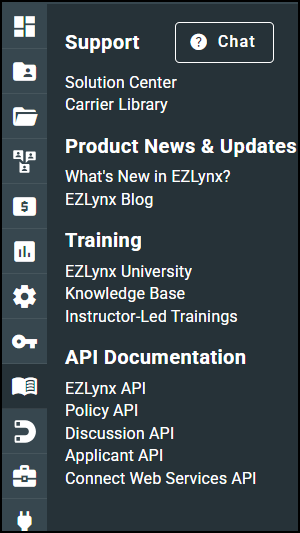
We made several updates to the left navigation Support Menu.
- We've updated our Training Articles link, now referred to as the Knowledge Base.
- We've also introduced a new section for instructor-led training, which includes the recorded webinars you're already familiar with. Future updates will expand this section to include live instructor-led training sessions.
- There is a new section titled Product News & Updates, where you will be able to quickly access information on new developments in the platform as well as the EZLynx blog.
- We've also added an option for you to quickly access the Live Chat option in EZLynx. Simply click on the Chat button at the top of the Support Menu and the live chat pane will open, allowing you to quickly engage our Support Team.
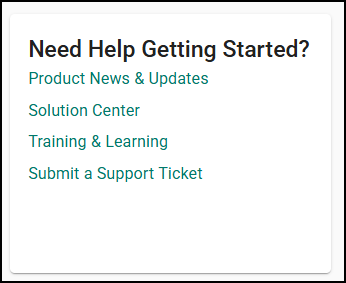
On the actual Homepage, you might also notice a bit of a different look for the Help Widget. We have updated the layout and options in the widget to help you find support options faster.
We hope you are excited for this new enhancements and look forward to our future releases. Please let us know if this article was helpful in learning about the new feature by answering the question below. Check out our related articles on the right-side of the page to learn more about EZLynx!
Did you find it helpful? Yes No
Send feedback