Closed Pilot for Live Fill Integration
Modified on: Thu, 10 Sep, 2026 at 6:53 PM
We're excited to announce the Closed Pilot for Applied Systems' Live Fill technology directly from the EZLynx Personal Lines Rater — letting you quote carriers that don't return real-time results without ever leaving EZLynx or re-keying a single field.
 | Please note: This is a Closed Pilot so the feature is not out at this time and we are not taking applications for any more pilot agencies currently. Please be on the lookout for updates in future releases. |
In today's hard market, agents are seeing close to half of their real-time submissions fail, forcing a trip to the carrier's own website and a full re-entry of the applicant's information. Live Fill closes that gap: it securely carries your applicant and quote data from EZLynx straight into the carrier's portal, so you can pick up exactly where EZLynx left off. Combined with Live Fill's ~560-carrier reach — more than double what EZLynx supports in real time today — this dramatically widens the field of carriers you can quote without duplicate data entry, and it lays the groundwork for EZLynx to become your single rating platform going forward.
| TABLE OF CONTENTS |
 | Did you know? - You can click on the images/gifs in our articles to make them bigger. |
What's in it for me?
- Quote carriers you couldn't before: Live Fill opens the door to roughly 560 carriers, including many non-standard and hard-to-place markets that EZLynx doesn't support in real time today — especially valuable in a hard market where appetite is tight.
- No more duplicate data entry: Your applicant and policy details carry over to the carrier's site automatically, so you're not retyping the same information you already put into EZLynx.
- Everything stays in one place: Live Fill quote results are saved back into EZLynx and shown right alongside your real-time results on the Quote Results page, so you can compare all your options in one view.
- Works the way you already work: Live Fill carriers show up using the same carrier setup, licensing, and Submit to Carriers workflow you use today — just with a Live Fill chip to tell them apart.
- Built for your whole agency: Whether you're a Retail agency, an Alliance Partner, or an MGA managing member agencies and branches, Live Fill carrier access follows the same hierarchy and permissions you already rely on.
Accessing the Feature
| Please note: This is a Closed Pilot so the feature is not out at this time and we are not taking applications for any more pilot agencies currently. Please be on the lookout for updates in future releases. |
Live Fill quoting works by prefilling your EZLynx application data into the fields on the carrier site. To do this, you will need to install the Live Fill for Applied Epic and EZLynx browser extension from the browser stores. The extension works in both Google Chrome and Microsoft Edge browsers.
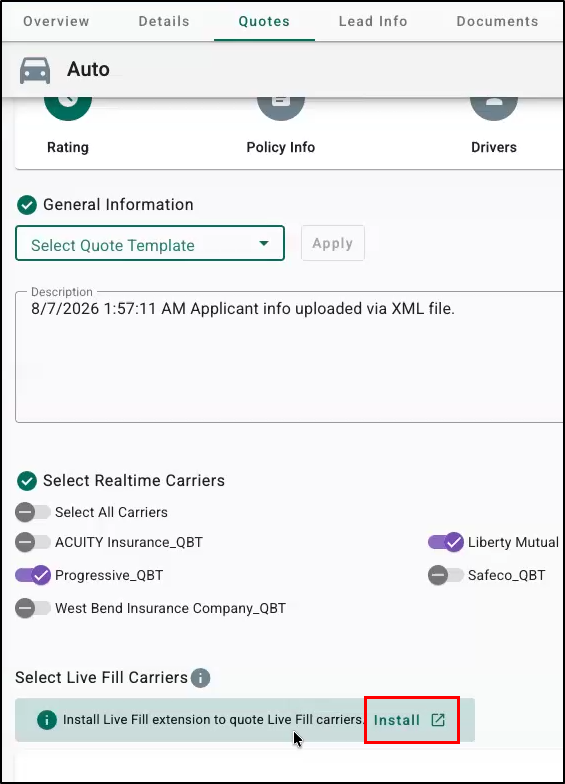
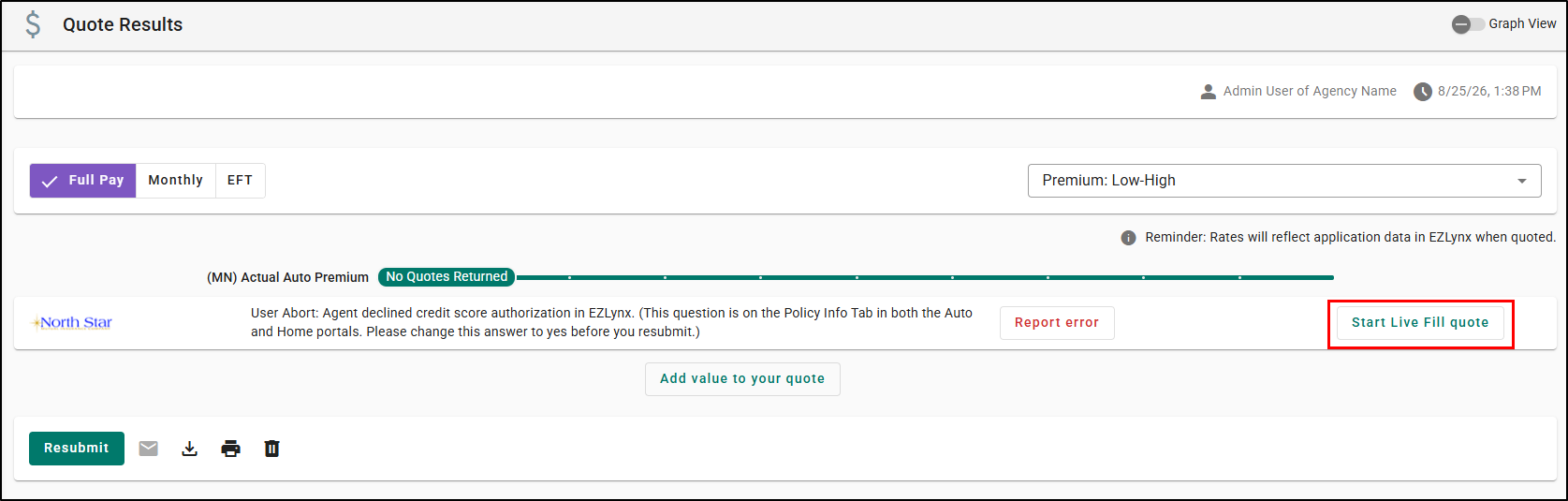
You can find it in the browser stores, or you can get directly to the extension page by selecting the Install option on a rating application or by selecting the Start Live Fill quote button on a Quote Results.
Once installed, Live Fill carriers appear alongside your real-time carriers throughout the normal rating workflow — there's no separate menu to learn.
 |  |
Add your Live Fill carriers
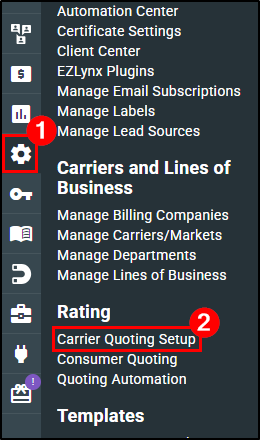
Agency Admins add Live Fill carriers the same way you add Real-Time carriers through the Carrier Quoting Setup page.
1. Hover over the Settings icon.
2. Choose Carrier Quoting Setup.
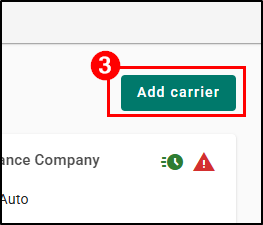
3. Click on the Add a carrier button.
4. Search for your carrier and select them from the list.
5. Use the state dropdowns to select which states you write business in for this carrier.
| Please Note: If you are a Network managing members/branches, you will also select the License Type and Agency that needs access to the carrier just like you do with Real-Time carriers. |
 |  |
Once you've selected a state, you'll see the Line of Business (LOBs) check box(es). Carriers with Live Fill available have their LOB options labeled with a Live Fill indicator alongside a Real Time indicator, so you always know which path a quote will take.
Real Time  | Live Fill |
Select carriers when rating
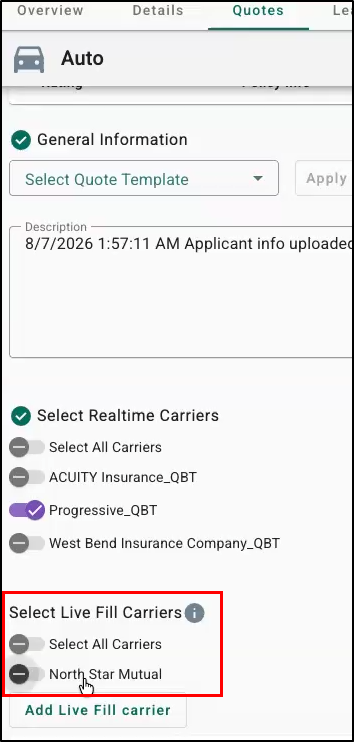
On the Carrier-Selection screen at the start of rating, Live Fill carriers appear in their own section below your real-time carriers. Select any combination of carriers.
| Please note: Live Fill requires at least one real-time carrier also be selected. |
Submit and set logins
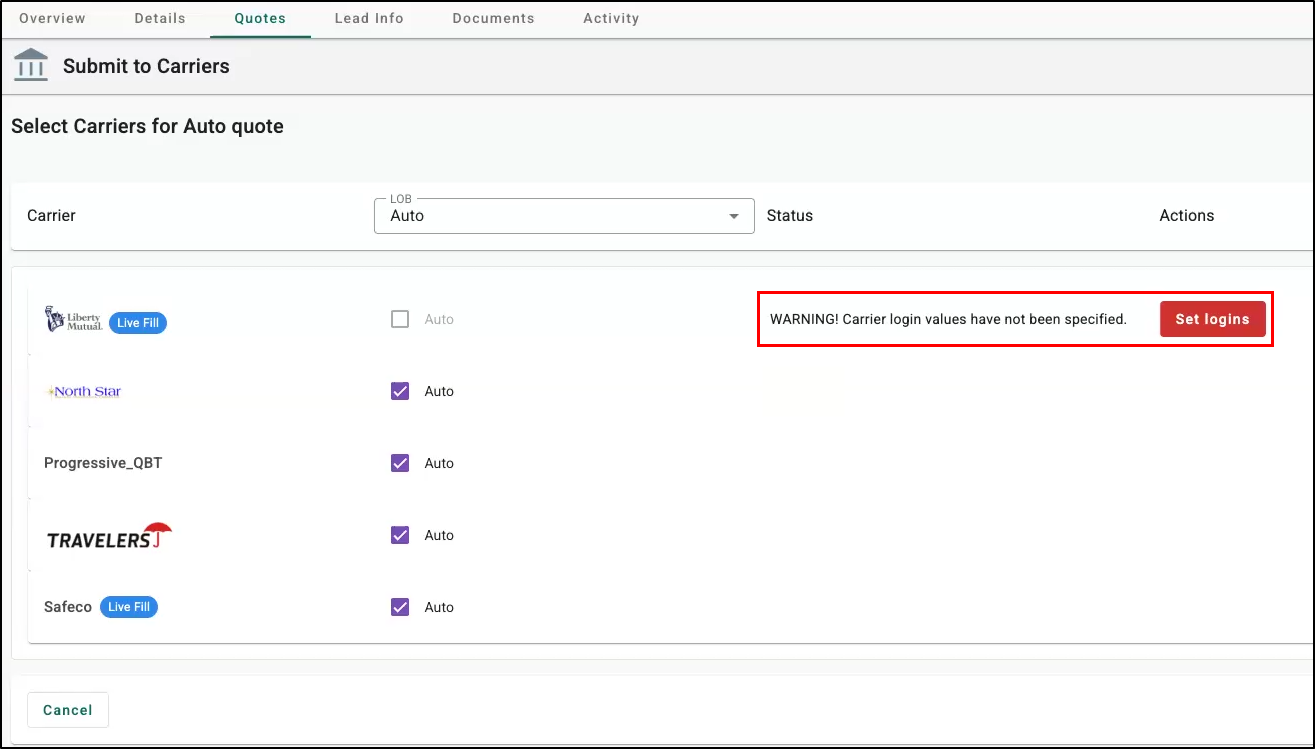
On Submit to Carriers, Live Fill carriers appear alongside real-time carriers with a chip identifying them as Live Fill. If a Live Fill carrier needs login credentials, use the Set Logins button right there to enter your username and password/agency code — no need to leave the submission screen.
Launch and quote
From the Quote Results page, select Start Live Fill Quote next to a Live Fill carrier (or add one on the spot with Add Live Fill Carrier if you didn't select it earlier). This launches the Live Fill browser extension, which opens the carrier's site and pre-fills the application using your EZLynx data.
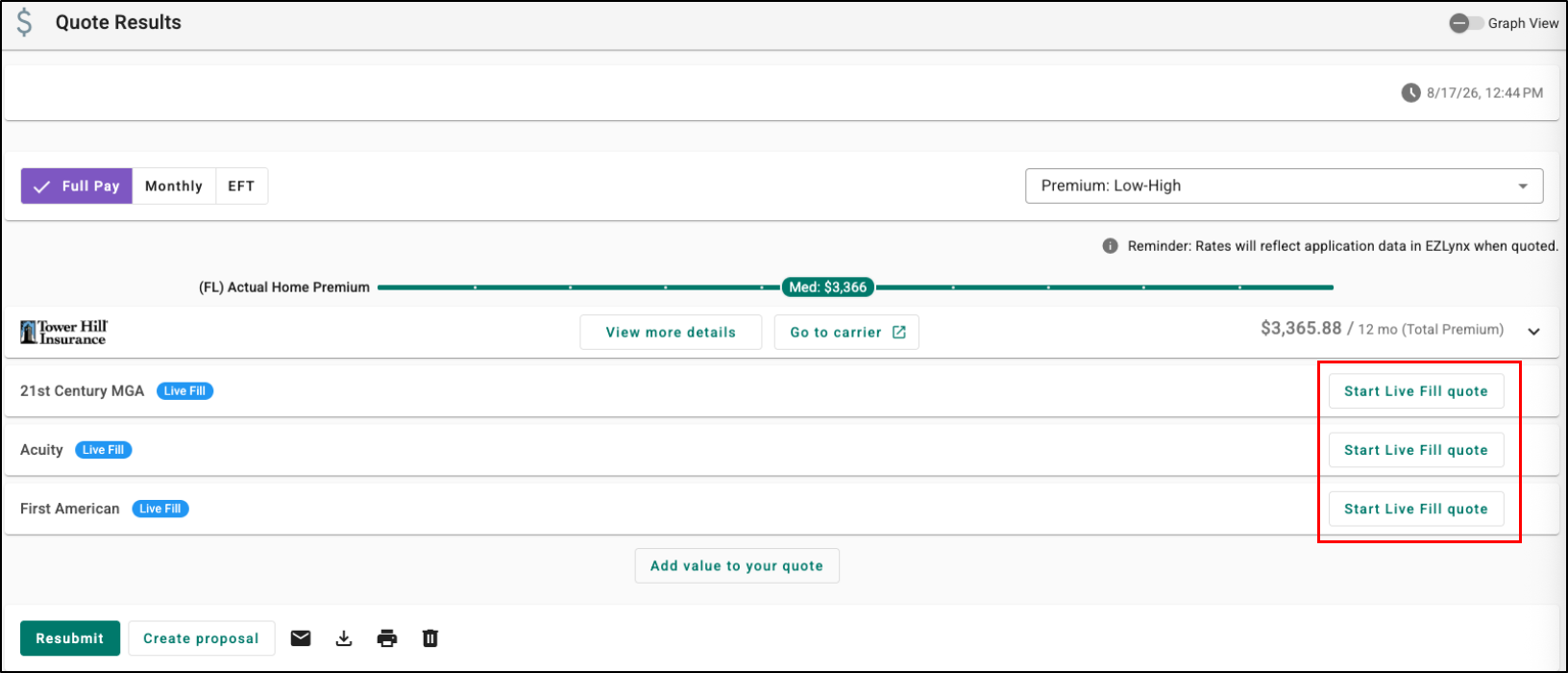
If a carrier requires a real-time quote that fails, you can also initiate a Live Fill quote for that carrier right from the failed result.

Save the result
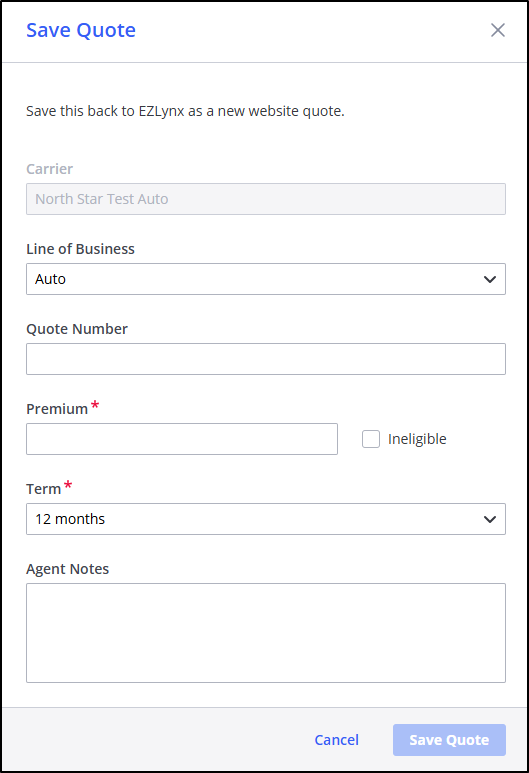
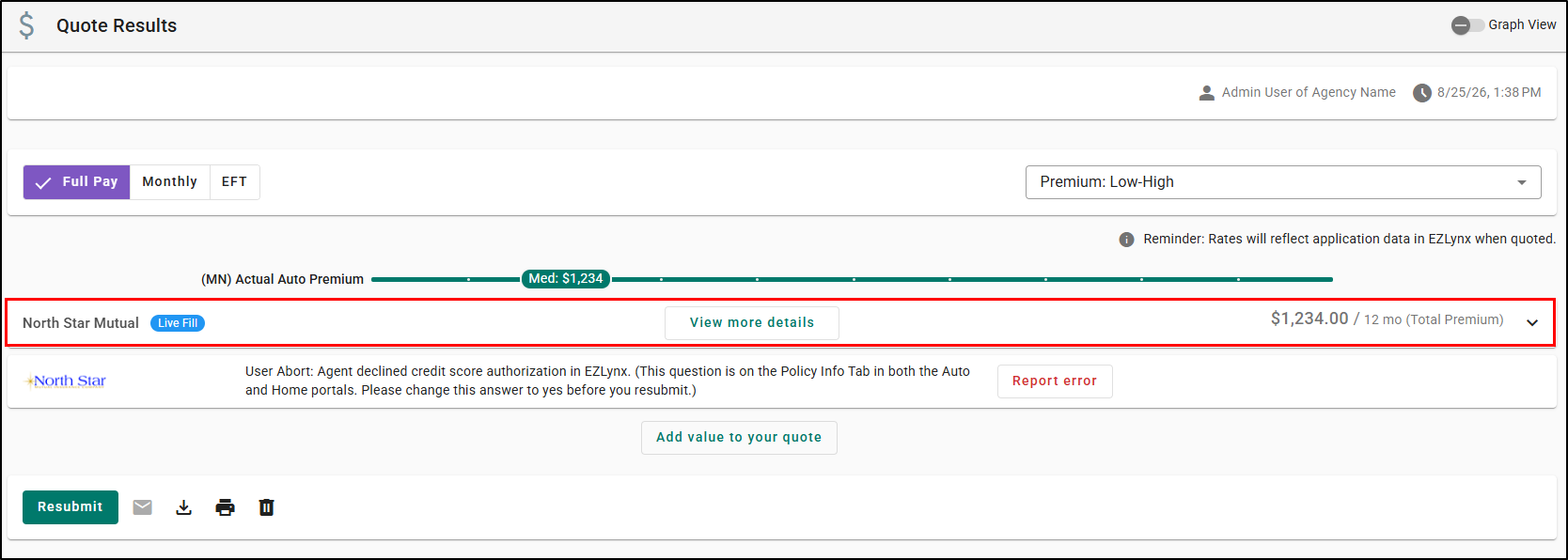
When you Save the Quote in the Live Fill extension, the premium, term, and any agent notes are sent straight back to EZLynx and appear on the Quote Results page alongside your other quotes — including bundled Auto & Home submissions, which are handled as separate Live Fill sessions per line of business and then shown together.
 |  |
Practical Applications
Here are 3 ways your agency can make the most out of this feature:
- Recovering a failed hard-market submission: An agent quoting Auto for a client gets a failure back from a real-time carrier. Instead of opening a second browser tab and re-typing everything, the agent selects Start Live Fill Quote right on the failed result and the applicant's data carries straight over — turning a dead end into a completed quote in the same session.
- Reaching non-standard carriers for a tough risk: A CA-based agency has a Home client who needs a non-standard carrier that EZLynx doesn't support in real time. The agency adds that carrier through Carrier Quoting Setup as a Live Fill carrier, and from then on it shows up right alongside their standard markets every time they rate that line of business.
- Managing carrier access across a branch network: An MGA administrator wants a specific Live Fill carrier available only to certain member agencies. Using the same organization-tree carrier setup they already use today, they grant access to the right branches, and each agency's producers see that carrier appear automatically in their rating workflow.
We hope this release article was helpful in learning about the Closed Pilot for the Live Fill feature. Be on the lookout for more information in future releases.
Did you find it helpful? Yes No
Send feedback