Preferred Language Field
Modified on: Tue, 16 Dec, 2025 at 5:12 PM
We’re excited to introduce a new enhancement that allows you to capture and manage an applicant’s Preferred Language directly within the platform. This addition provides a more personalized, accurate, and efficient way to support diverse clients while strengthening communication across your agency.
The Preferred Language field offers a standardized way to note what language each applicant prefers to communicate in, ensuring your team can deliver a more tailored experience from the very first interaction.
TABLE OF CONTENTS
- What's in it for me?
- New Preferred Language Field
- Preferred Language Filters in Automation Center
- Practical Applications
 | Did you know? - You can click on the images in our articles to zoom in. |
What's in it for me?
- More personalized communication – Communicating in someone’s preferred language makes interactions feel personal and respectful, which builds trust and loyalty from the start.
- Greater operational accuracy – A standardized field means your staff doesn’t have to guess or manually track language preferences.
- Support for diverse communities – With a comprehensive list of commonly used languages, your agency can better serve multilingual clients and expand accessibility.
New Preferred Language Field
A new Preferred Language field has been added to the Details tab for both Personal Lines and Commercial lines applicants. This field allows you to quickly select or search for one preferred language from a predefined list, with English set as the default option.
The new Preferred Language field can be found on:
- Personal Applicants
- Create New Applicant — after the Lead Source field
- Applicant Details Page — after Lead Source and before the Deceased checkbox
- Commercial Applicants
- Create Commercial Applicant — after the Date Business Started field
- Applicant Details Page — after the Date Business Started field
Personal Lines Example 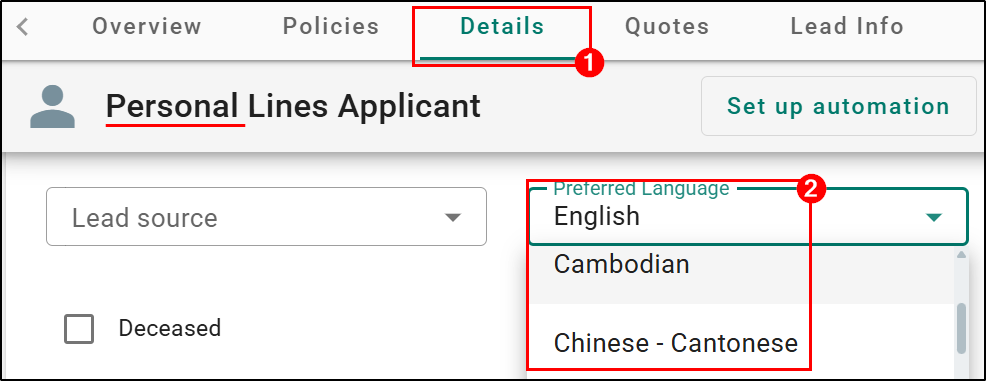 | Commercial Lines Example 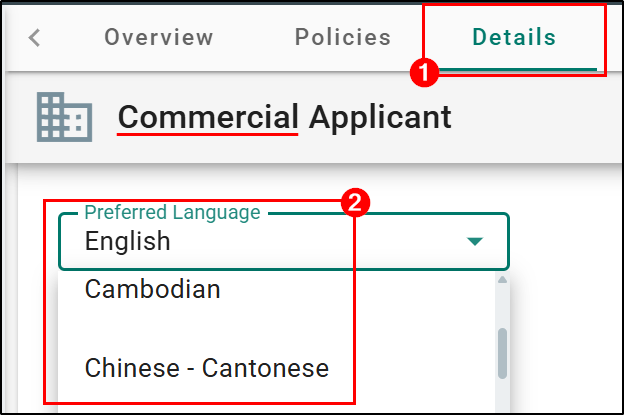 |
The pre-defined list of 48 available languages include:
English (default), Amharic, Arabic, Armenian, Bengali, Cambodian, Chinese – Cantonese, Chinese – Mandarin, Dari, Dutch, Filipino, French, French Creole, Farsi, German, Greek, Gujarati, Haitian Creole, Hebrew, Hindi, Hmong, Ilocano, Italian, Japanese, Khmer, Korean, Laotian, Navajo, Persian, Polish, Portuguese, Punjabi, Romanian, Russian, Samoan, Serbo-Croatian, Spanish, Swahili, Tajik, Tagalog, Tamil, Telugu, Thai, Ukrainian, Urdu, Vietnamese, Yoruba.
Preferred Language Filters in Automation Center
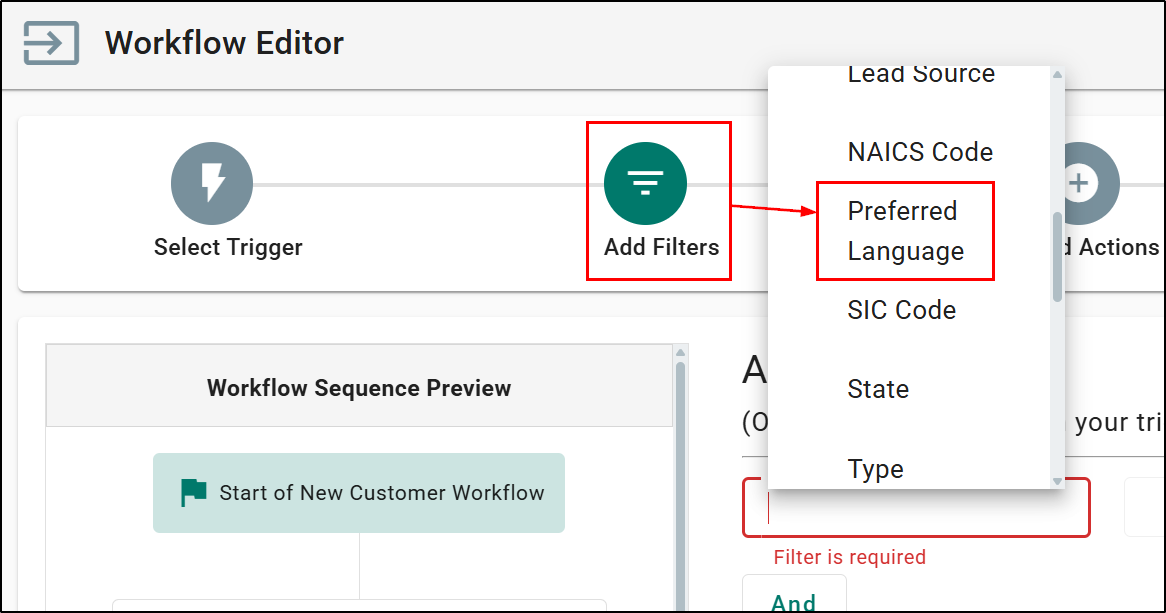
Within the Add Filters step of the Workflow Editor in Automation Center, we have also added a new filter option for Preferred Language.
These new filter can be applied when:
- Creating a new workflow
- Editing an existing workflow
Practical Applications
- Personalized Communication
Agents can send emails or texts in the applicant’s preferred language, improving engagement, and reducing misunderstandings.
- Better Customer Service
When an agent or CSR sees the preferred language, they can route calls or chats to team members fluent in that language.
We hope you are excited for this new feature and look forward to our future releases. Please let us know if this article was helpful in learning about the new feature by answering the question below. Check out our related articles on the right-side of the page to learn more about EZLynx!
Did you find it helpful? Yes No
Send feedback