Submission Center Branch Support Phase 2
Modified on: Wed, 17 Dec, 2025 at 9:16 AM
Building on our recent Branch Support release, we are excited to deliver precise visibility and improved workflow efficiency to the Submission Center. We have expanded the "Submission By" filter to support User-Level granularity on both the Submissions and Snapshot pages, giving you detailed insight into individual performance. Additionally, the Task Page has been overhauled with a robust Search Bar and a new Assigned Producer filter, empowering you to locate and manage critical tasks instantly.
TABLE OF CONTENTS
- What's in it for me?
- Submissions Page: "Submission By" Filter
- Snapshot Page: "Submission By" Filter
- Task Page: New Filters & Search Functionality
- Practical Applications
 | Did you know? - You can click on the images in our articles to zoom in. |
What's in it for me?
- Improved Organizational Visibility and Control: For agencies with a branch structure, the enhanced Submission Center and new "Submission by" filter provide tailored visibility. Main office managers can oversee all submissions, while branch users can easily monitor their own team's or other branches' activities, fostering greater collaboration and a clear audit trail.
- A More Intuitive and User-Friendly Experience: The modern interface, which replaces tabs with steppers and introduces a helpful left-side navigation panel, makes the entire process more intuitive and easier to learn. This not only speeds up work for current users but also simplifies the onboarding process for new team members
Submissions Page: "Submission By" Filter
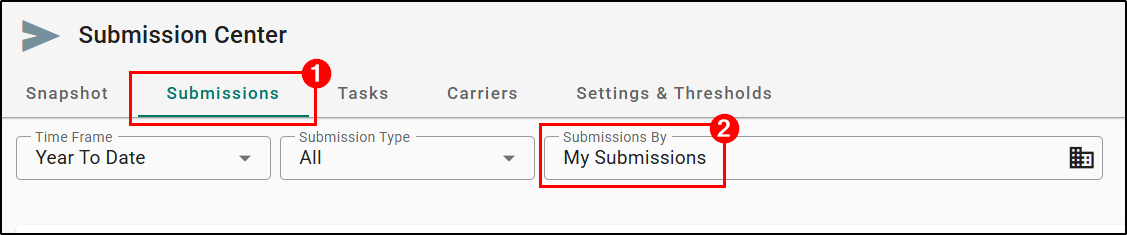
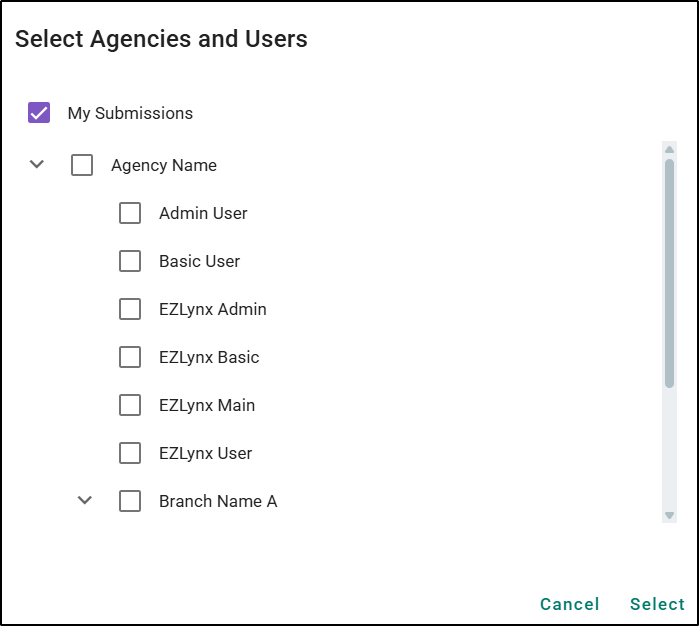
The "Submission By" filter you rely on has been significantly upgraded. While you could previously filter by Organization or Branch, we have now added User-Level Filtering. This allows you to drill down and view submissions for specific individuals within those branches, providing a much deeper level of oversight.
Snapshot Page: "Submission By" Filter
We have replaced the limited "My Submissions" vs. "Agency Submissions" toggle on the Snapshot Page with the fully robust "Submission By" filter. This upgrade moves beyond high-level toggles, allowing you to slice and dice your submission data with precision right from the overview screen. Just like the enhanced Submissions page, this filter now supports User-Level granularity.
- Users at the Parent location will be able to see across your entire organization.
- Users at Branch locations will be able to see their location or all your organization's branches depending on your agency's setup.

Task Page: New Filters & Search Functionality
We have overhauled the Task Page to put the information you need at your fingertips by introducing new tools!
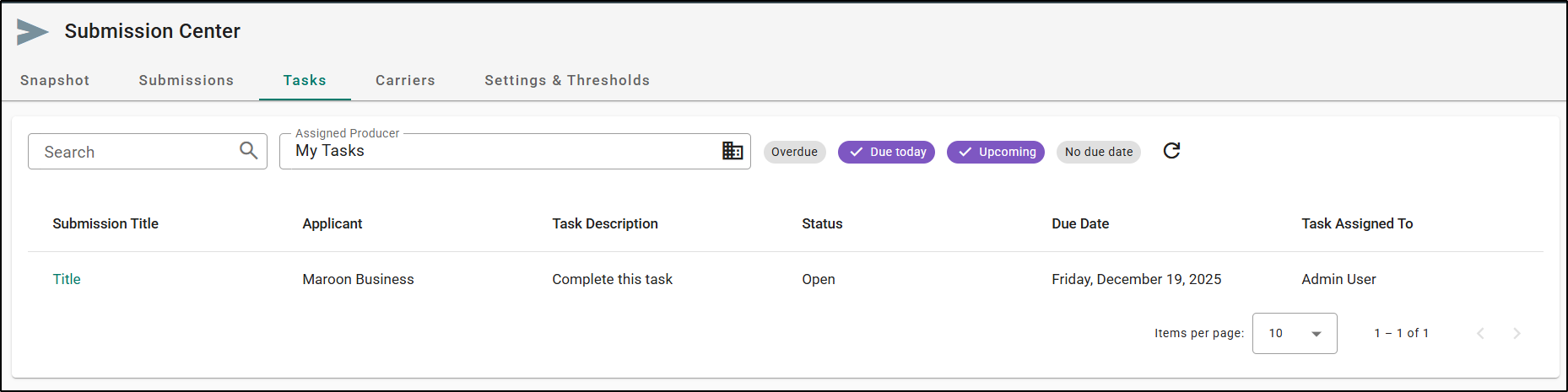
- New "Assigned Producer" Filter: We have added a brand new Assigned Producer filter to the Task page. This was not previously available, and it now allows you to filter tasks by the specific producer responsible for them. It features an enhanced look and feel, making it easier to navigate and select producers to manage team workloads effectively.
- New Search Functionality: We have also introduced a robust Search Bar positioned conveniently alongside the existing status filters. You can now instantly locate specific tasks by searching across:
- Submission Title
- Applicant Name
- Task Description
- Status
- Task Assigned To
Practical Applications
- Optimizing Team Workload & Performance Reviews
As an Admin, you can now use the Snapshot Page to filter specifically by an individual producer (e.g., "John Smith"). This allows you to instantly visualize their specific submission volume, hit ratios, and current pipeline status without the noise of the entire branch's data. If you notice "John" is overwhelmed with "Quote Needed" submissions while another producer is light, you can proactively rebalance the workload to ensure faster turnaround times.
- Managing Unexpected Absences
If a producer calls out sick or is on unexpected leave, ensuring their critical tasks don't slip through the cracks is vital. You can now go to the Task Page, use the new "Assigned Producer" filter to select the absent employee, and then use the Search Bar to instantly find high-priority items like "Bind Request" or "Urgent Follow-up." This allows you to quickly reassign these specific tasks to active staff, ensuring seamless service continuity for your clients.
We hope you are excited for this new feature and look forward to our future releases. Please let us know if this article was helpful in learning about the new feature by answering the question below. Check out our related articles on the right-side of the page to learn more about EZLynx!
Did you find it helpful? Yes No
Send feedback