7 Days option for Renewal Range in Retention Center
Modified on: Thu, 9 Apr, 2026 at 8:35 PM
In this release, an additional “7 Days in Renewal Range” option has been introduced alongside the existing options. This additional 7-day option will provide you with greater flexibility of choosing renewal range option in Retention Center and Automation Center workflow executions.
When you navigate to Retention Center Settings and go to Renewal List tab, you will see an additional option of 7 Days in Renewal Range apart from the options that already exist now. The renewal range specifies which supplementary policies will be included in a customer's pending renewal status in Retention Center following the receipt of the initial renewal download.
For example, if you choose the option of 7 days and have an auto policy with effective dates of 1 April 2025 to 1 April 2026 and Home policy with effective dates of 7 April 2025 to 7 April 2026, then applicant will be shown in Retention Center and workflow from Automation Center which is created using Applicant Added to the Renewal List will fire on 7 April as both policies are expiring withing a gap of 7 days and have received renewal download.
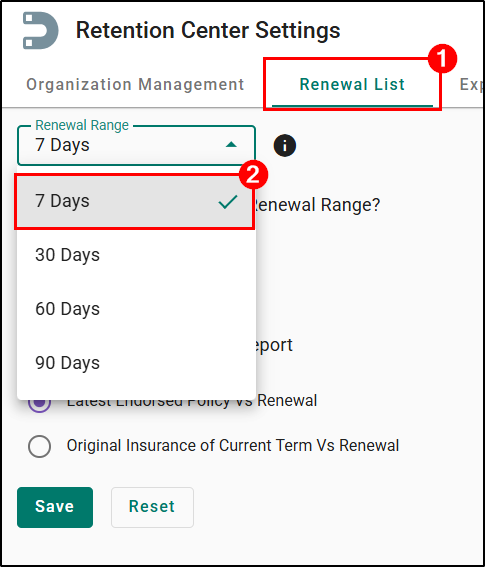
We hope you are excited for this new feature and look forward to our future releases. Please let us know if this article was helpful in learning about the new feature by answering the question below. Check out our related articles on the right-side of the page to learn more about EZLynx!
Did you find it helpful? Yes No
Send feedback