Updated Saving Controls and Logic for Forms
Modified on: Tue, 17 Mar, 2026 at 1:42 PM
This release we focused on optimizing your experience within the ACORD form previewer. By introducing more intuitive saving controls and intelligent data preservation, we are reducing the clicks required to manage documentation and ensuring that no data is lost when navigating complex multi-form submissions.
TABLE OF CONTENTS
- What's in it for me?
- Direct "Save" Access for Immediate Updates:
- One-Click "Save and Close" Functionality:
- Intelligent Auto-Save on Navigation:
- Practical Applications
 | Did you know? - You can click on the images in our articles to zoom in. |
What's in it for me?
Work Faster With Fewer Clicks
- With the new “Save” and “Save & Close” actions surfaced directly in the form preview, agents can update documents without digging through menus or breaking their review flow. This means quicker turnaround on policy documents and less time spent navigating the system.
Reduced Risk of Errors and Lost Work
- Intelligent autosave ensures all edits are captured automatically when switching between ACORD forms—eliminating accidental data loss and those frustrating unsaved changes popups. Agents can move confidently across multiform workflows knowing their updates are always preserved.
Intelligent Auto-Save on Navigation
One of the most significant improvements to multi-form workflows is the implementation of auto-save logic. When you navigate between different ACORD forms within the previewer, the system now automatically captures and saves any new field values or updates. This removes the risk of data loss and eliminates redundant browser alerts for unsaved changes when moving between documents.
Direct "Save" Access for Immediate Updates
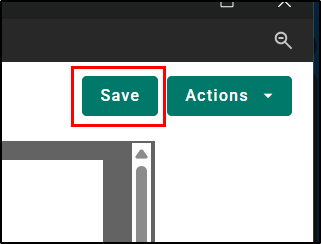
To eliminate the need for searching through sub-menus, we have surfaced a dedicated "Save" button directly on the top right of the form preview page. This will allow you to preserve changes instantly without interrupting their review workflow.
One-Click "Save and Close" Functionality
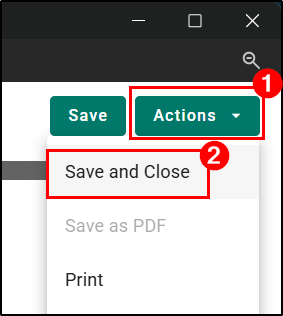
We’ve introduced a new “Save and Close” action to the form previewer. This enhancement allows agents to finalize their edits and return to the document list in a single step. This button is visually distinct and strategically placed under the Actions option.
Practical Applications
Faster Completion of Multi-Form Submissions
- Agents often work through multiple ACORD forms when preparing a policy package or processing endorsements. With autosave and quick access Save/Save & Close actions, they can move between forms without fear of losing progress—making it easier to complete submissions in one smooth session and reduce back and forth corrections.
More Efficient Document Review and Corrections
- When reviewing client information or making updates after a carrier request, agents can instantly save edits without navigating away from the form. The “Save & Close” shortcut helps them quickly finalize changes and return to the document list, speeding up tasks like auditing forms, correcting errors, or updating renewal packets.
We hope you are excited for this new feature and look forward to our future releases. Please let us know if this article was helpful in learning about the new feature by answering the question below. Check out our related articles on the right-side of the page to learn more about EZLynx!
Did you find it helpful? Yes No
Send feedback