Aligning with Carrier Texting Standards
Modified on: Thu, 11 Jun, 2026 at 4:59 PM
To make sure EZLynx remains compliant with Carrier Texting Standards, we've made several enhancements for the EZLynx Two-Factor Authentication (2FA) and the Text Message Registration process.
This release for Two-Factor Authentication (2FA) we've added:
- Clear opt‑in messaging during 2FA setup
- Automated HELP and STOP keyword responses for 2FA text alerts
- Safeguards that prevent authentication texts from being sent to phone numbers that have opted out
If you have opted out of 2FA text messages, you can still complete authentication by selecting an alternative method, such as email or an authenticator app, with clear guidance throughout the process.
For Text Message Registration, we've enhanced the texting brand and campaign registration experience to help you get approved faster and avoid common carrier rejections. When completing a new brand or campaign registration, agencies will now be required to provide a Privacy Policy URL and Terms & Conditions URL directly on the registration page. This change applies only to new registrations—existing registrations are not impacted.
TABLE OF CONTENTS
- What's in it for me?
- Two-Factor Authentication (2FA) Updates
- Texting Registration Enhancements
- Practical Applications
 | Did you know? - You can click on the images in our articles to make them bigger! |
What's in it for me?
- Uninterrupted access to EZLynx: If text messages aren’t available, you are clearly guided to another verification option so they can complete login without delays.
- Clarity and confidence: A simple opt‑in disclosure explains what’s being agreed to before setup begins.
- Immediate help: Text HELP or INFO to receive support contacts instantly.
- Compliance, built in: STOP keywords unsubscribe users and we automatically prevent further texts to suppressed numbers.
- Faster texting approval: New Privacy Policy and Terms & Conditions fields streamline campaign registration and reduce rejections. These updates add clearer guidance, set better expectations up front, and help ensure submissions meet carrier requirements the first time.
Two-Factor Authentication (2FA) Updates
This release for Two-Factor Authentication (2FA) we've added:
- a new opt-in disclosure messaging
- messaging if your phone number is on a carrier texting suppression list due to opting out of text messages from EZLynx
- automated HELP, INFO, and STOP keyword support
Please note, if you don't want to use text messaging for 2FA you can still enroll using email or third party authenticators.
Disclosure & Carrier Suppression List Messaging
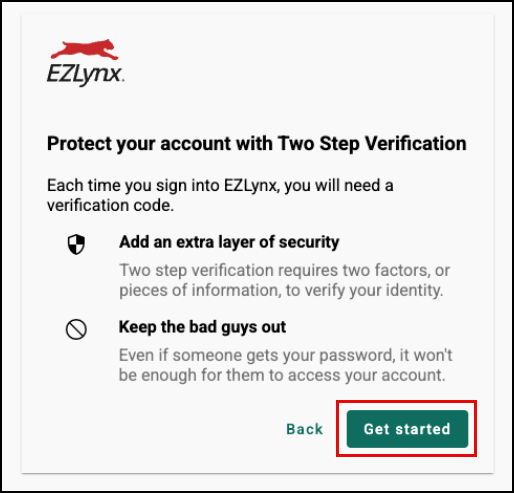
If this is your first-time logging into your account, the system will prompt you to enroll in two-factor authentication(2FA). You are presented with a message about the benefits of enrolling and why 2FA is important. To get started with the enrollment process, select the Get Started button.
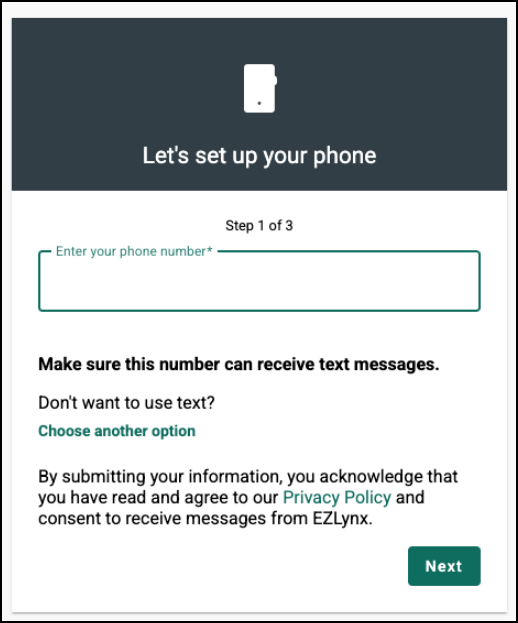
Review the new opt‑in disclosure before continuing: “By submitting your information, you acknowledge that you have read and agree to our Privacy Policy and consent to receive messages from EZLynx.” The Privacy Policy link opens in a new tab.
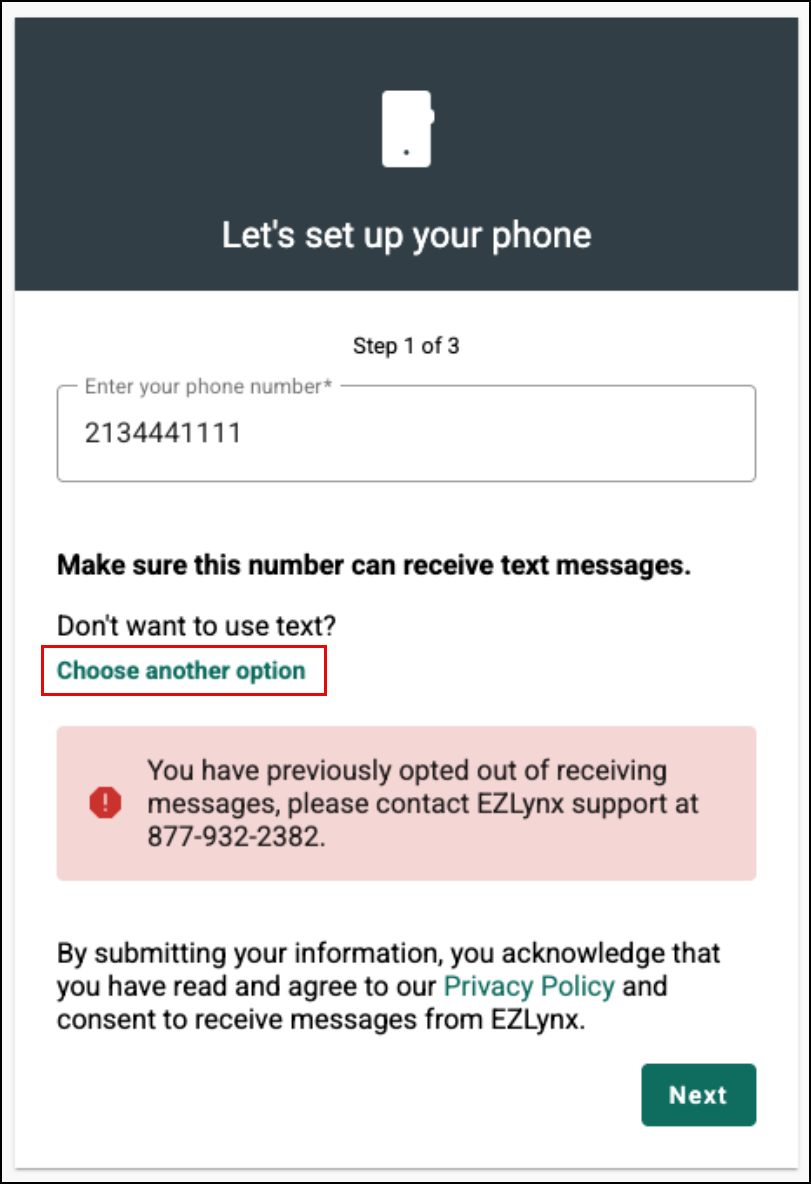
If your phone number is on the carrier suppression list, you’ll see a friendly message with support contact details to help you opt in again and proceed. If you who have opted out, you can still complete 2FA by choosing email or an authenticator app.
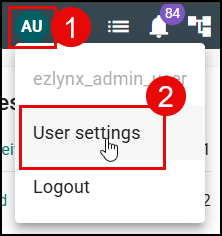
If you have already enrolled with two-factor authentication (2FA) but want to enroll with a secondary option or update your current two-factor information, you can do so in your User Settings.
To update your two-factor authentication (2FA) settings:
1. Select your User Icon in the top-right
2. Choose User Settings from the menu. This will take you to the User Settings page.
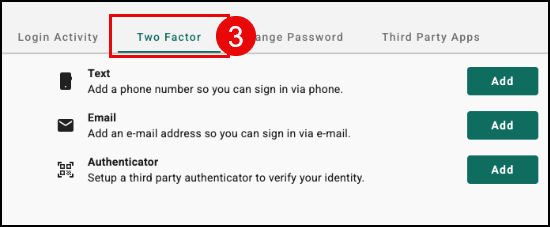
3. On the User Settings page, select the Two Factor tab.
On the Two Factor tab, you can manage all your settings related to 2FA including deleting methods, updating methods, and adding new methods.
 |  |
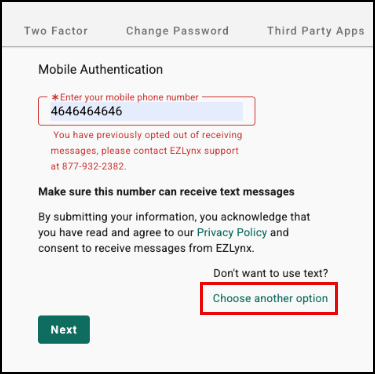
If the mobile phone number entered has previously opted out of receiving messages, you will see a message indicating that they have opted out and that text authentication is unavailable for that number.
From this screen, you can select ‘Choose another option’ to proceed with an alternative authentication method or contact EZLynx Support.
Automated HELP and STOP Keyword Support
To support TCPA requirements and carrier standards, EZLynx Two‑Factor Authentication (2FA) now includes automated HELP/INFO and STOP keyword workflows for 2FA short‑code messages.
HELP/INFO workflow
When you texts HELP or INFO in response to a Two‑Factor Authentication alert, they receive an automated message with EZLynx support contact information, along with standard messaging disclosures and instructions on how to opt out by replying STOP.
- Keywords: HELP, INFO
- Response: “EZLynx Two‑Factor Authentication Alerts: Help at support@ezlynx.com or 877‑932‑2382. Msg & data rates may apply. Text frequency may vary. Text STOP to cancel.”
STOP workflow
When a user texts STOP, STOPALL, UNSUBSCRIBE, CANCEL, END, REVOKE, OPTOUT, or QUIT in response to a Two‑Factor Authentication alert, they receive an automated confirmation that they have been unsubscribed from EZLynx Two‑Factor Authentication text alerts, that no further messages will be sent, and that they can reply HELP for assistance or START to resubscribe, along with standard messaging disclosures.
- Keywords: STOP, STOPALL, UNSUBSCRIBE, CANCEL, END, REVOKE, OPTOUT, QUIT
- Response: “STOP: You are unsubscribed from EZLynx Two‑Factor Authentication alerts. No more messages will be sent. Reply HELP for help or call 877‑932‑2382. Reply START to resubscribe. Msg & data rates may apply.”
Texting Registration Enhancements
Due to ongoing carrier and regulatory requirements, we’ve enhanced the A2P10DLC texting brand and campaign registration experience to help agencies submit complete, accurate registrations and avoid processing delays.
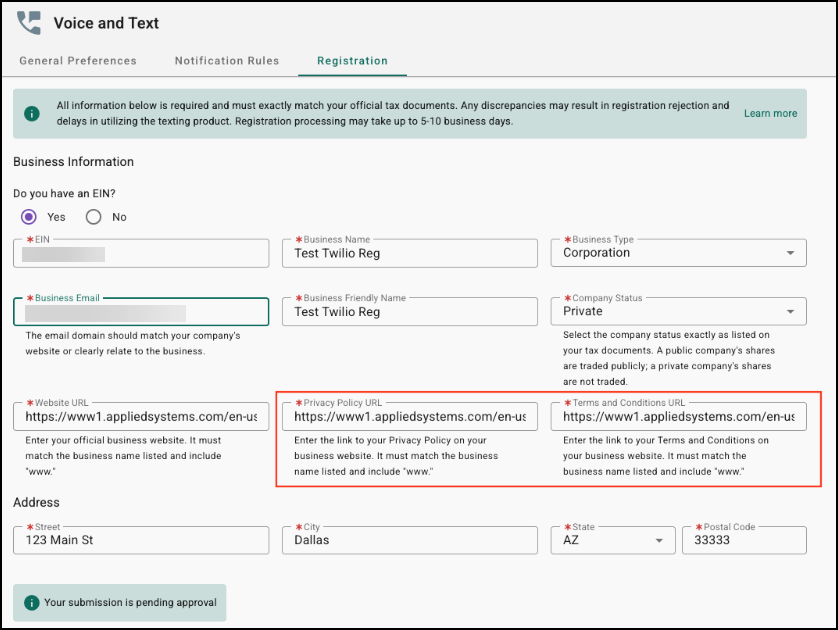
When registering for texting, agencies will now see two new required fields on the registration page:
- Privacy Policy URL
- Terms & Conditions URL.
These new fields are supported by inline helper text that clearly explains what information must be provided and why accuracy matters.
By guiding agencies to enter valid, business‑owned URLs that align with carrier standards, these updates help reduce registration rejections and ensure a smoother approval process.
Please note, this enhancement applies only to new brand or campaign registrations; existing registrations are not impacted.
Practical Applications
Reduce login issues without increasing support tickets
- Agencies can ensure users are never blocked from accessing EZLynx due to texting limitations. If a phone number has opted out of receiving 2FA texts, users are clearly guided to alternate authentication methods such as email or an authenticator app, allowing them to sign in without contacting support.
Strengthen compliance with minimal user friction
- Automated HELP and STOP keyword handling for 2FA text alerts ensures compliance with carrier and TCPA requirements out of the box. Agencies benefit from built‑in safeguards that automatically suppress messages to opted‑out numbers, helping maintain reliable delivery and avoid carrier violations.
Improve success rates for new texting registrations
- Administrative users can complete new brand or campaign registrations more efficiently by providing Privacy Policy and Terms & Conditions URLs directly on the registration page. Clear inline guidance helps agencies submit accurate information the first time, reducing rejections and speeding up carrier approval.
We hope you are excited for these new enhancements, and look forward to our future releases for more updates. Please let us know if this article was helpful in learning about the new enhancements by answering the question below. Check out our related articles to the right-side of the page to learn more about EZLynx!
Did you find it helpful? Yes No
Send feedback