Florida Underwriting Eligibility Enhancements
Modified on: Thu, 11 Jun, 2026 at 8:46 PM
Florida users report that our rater surfaces quotes that appear eligible, but carriers later decline them because EZLynx does not ask key underwriting questions. Competitor raters explicitly determine carrier eligibility and show decline reasons upfront, creating a smoother workflow. This gap results in quote declines on carrier websites, Citizen’s eligibility issue, additional agent efforts, and lower trust in our rating accuracy.
In this release, we are going to address this gap with various enhancements throughout the Rating Engine applications for our Florida users so you can quote with confidence and work faster!
TABLE OF CONTENTS
 | Did you know? - You can click on the images in our articles to make them bigger! |
What's in it for me?
- Quote with confidence: Capture eligibility details upfront to reduce surprise declines later.
- Work faster: Fewer carrier website do-overs and less manual re-entry means more time for selling.
- Cleaner workflows: All underwriting questions are logically organized where you expect them, including Dog Information within Underwriting Information.
- Better renewal continuity: Endorsement and dwelling info flows are aligned to preserve selections across renewals.
- Consistent data everywhere: New fields appear across Rating and are supported in connected systems updated such QAS templates and CQ portals.
How it works
We have added 19 fields which you will see on various screens of the Home and Dwelling Fire application screens. Let us go through each of the screens and see what has been added.
Rating page
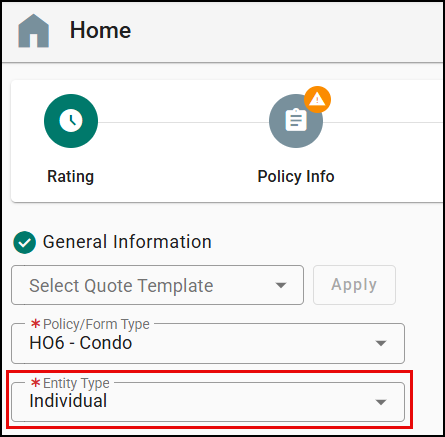
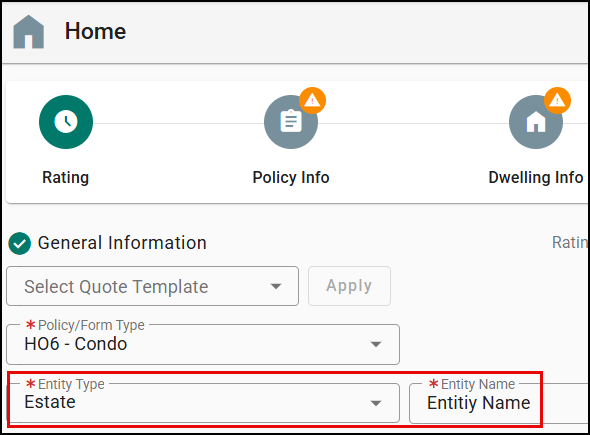
A new field “Entity Type” is added on the Rating tab of Home and Dwelling Fire application: You can choose Estate, Individual, LLC, LLP, Trust, or Joint. If you choose other than Individual, you need to enter an Entity Name.
 |  |
Policy Info alignment
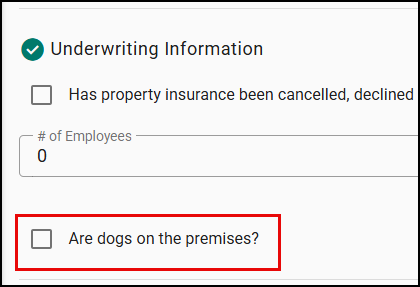
Dog Information section has been moved within Underwriting Information section for a single, consolidated view.
Dwelling Info
The following fields were added to the Home Info section of the Dwelling Info tab:
- BCEG
- Garage Type
- You need to enter “Number of Cars” field if you choose other than ‘No Garage’.
- Plumbing Material
- Water Heater Location
- Water Heater Type
- Water Heater Year
- Existing Damage
- Type of Electrical System
- Roof Loss Settlement
- Any recalled or discontinued electrical panels (FPE, Zinsco, Challenger, Stab‑Lok)?

Coverage
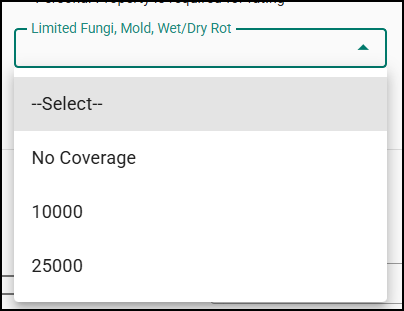
A new field “Limited Fungi, Mold, Wet/Dry Rot” was added on the Coverage tab of Home and Dwelling Fire application.
Endorsements
The following fields are added under the Endorsements Information section of the Endorsements tab:
- Equipment Breakdown
- Golf Cart Physical Damage & Liability
- Limited Screen Enclosure/Carport Coverage
- Service Line
- Sinkhole Coverage
- Water Backup or Sump Overflow
- Water Damage Coverage

Renewal workflow
When it comes to the Renewals, Citizens need some of the fields to be non-editable. Below is a table which shows which of the new fields we added in this release are editable vs non-editable during the renewal process for Citizens.
| Field Name | Editable on Renewals? |
|---|---|
| Water Backup Or Sump Overflow | Yes |
| Water Damage Coverage | No |
| Equipment Breakdown | Yes |
| Golf Cart Physical Damage & Liability | Yes |
| Sinkhole Coverage | No |
| Limited Fungi, Mold, Wet/Dry Rot | No |
| Entity Type | No |
| Limited Screen Enclosure/Carport Coverage | Yes |
| BCEG | No |
| Service Line | Yes |
| Plumbing Material | Yes |
| Water Heater Type | Yes |
| Water Heater Location | Yes |
| Water Heater Year | Yes |
| Existing Damage | Yes |
| Garage Type | Yes |
| Roof Loss Settlement | No |
| Type of Electrical System | Yes |
| Any recalled or discontinued electrical panels (FPE, Zinsco, Challenger, Stab-Lok)? | Yes |
Practical Applications
3 ways your agency can get the most out of this feature!
- Pre‑qualify faster: Enter BCEG, garage, plumbing, and water heater details at quote start to avoid downstream eligibility blockers—saving time and boosting close rates.
- Offer the right protection: Present endorsements like Service Line or Water Backup during the quote to increase attachment and upsell opportunities.
- Align ownership early: Use Entity Type to correctly reflect how the property is held, ensuring accurate documentation and fewer changes later.
We hope you enjoy these enhancements to the rating engine and look forward to our future releases. Please let us know if this article was helpful in learning about the new enhancements by answering the question below. Check out our articles on the right-side to learn more about EZLynx!
Did you find it helpful? Yes No
Send feedback